Periodically, Tulip releases a new Long-Term Support (LTS) version of the platform for organizations in regulated environments. The latest version of Tulip, LTS15, introduces app generation, automated app documentation, enhanced import/export, and easier device connectivity, empowering manufacturers to accelerate their digital transformation.
For more detailed notes on all the changes in LTS15, please log in to Tulip Docs.
See the LTS15 notes in Tulip Docs →
Accelerate App Development, Documentation, and Deployment
Transform how you build and deploy digital workflows with app generation, automated documentation, and improvements to version comparison.
.png)
Build Apps from SOPs in Minutes with AI Composer
AI Composer helps teams move faster by transforming existing SOPs and documents into interactive Tulip apps — cutting manual build time by up to 80% and freeing engineers to focus on improvements instead of setup. AI Composer makes it easier than ever to standardize and deploy digital work instructions across teams and sites.
Now with template support, AI Composer allows you to use your own branded applications, logic, and best practices directly to generate apps, ensuring every new app aligns with your organization’s standards. The result: faster builds, consistent workflows, and AI-powered apps that reflect the way your operations already run.
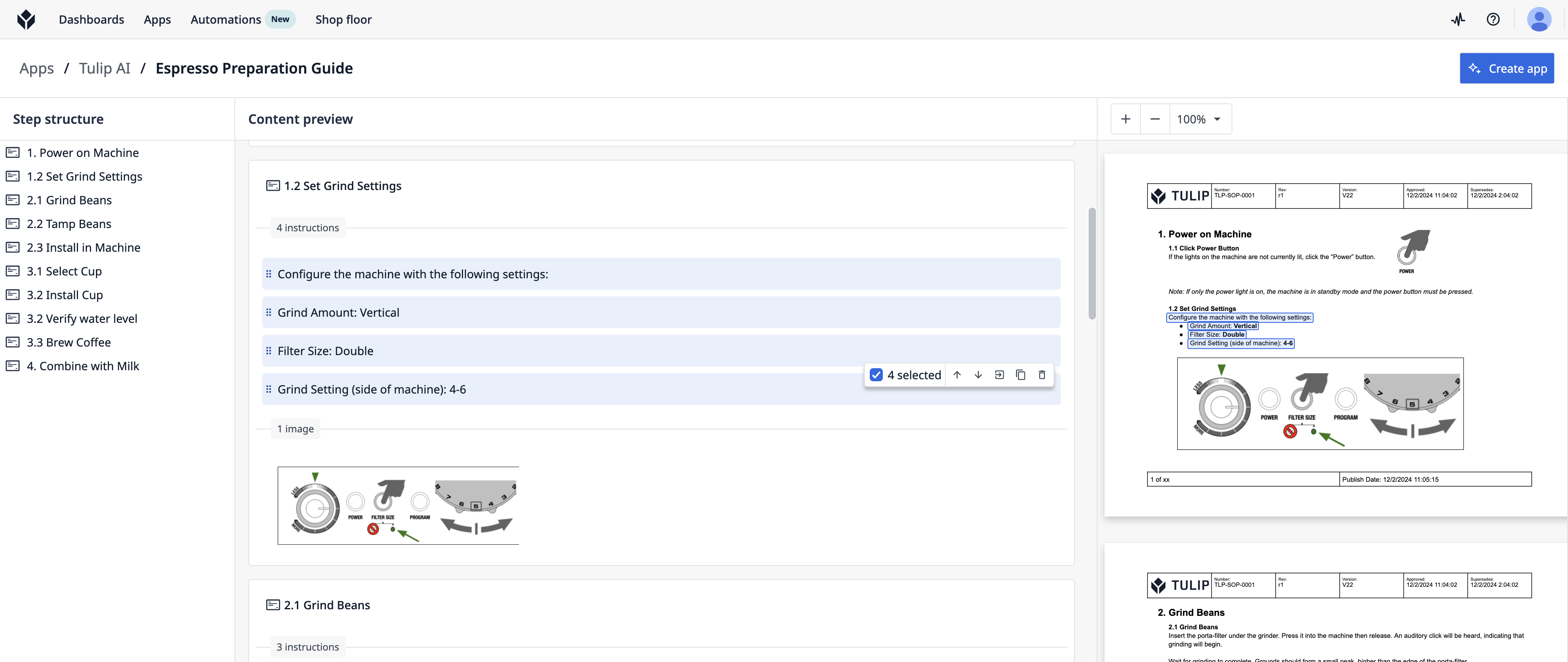
If you were at Operations Calling 2025, you likely also saw a sneak peek demo of a video input, a new feature coming soon to AI Composer.
Learn more about AI Composer, including templates and the video-to-app demo.
Accelerate App Documentation with App Diagrams
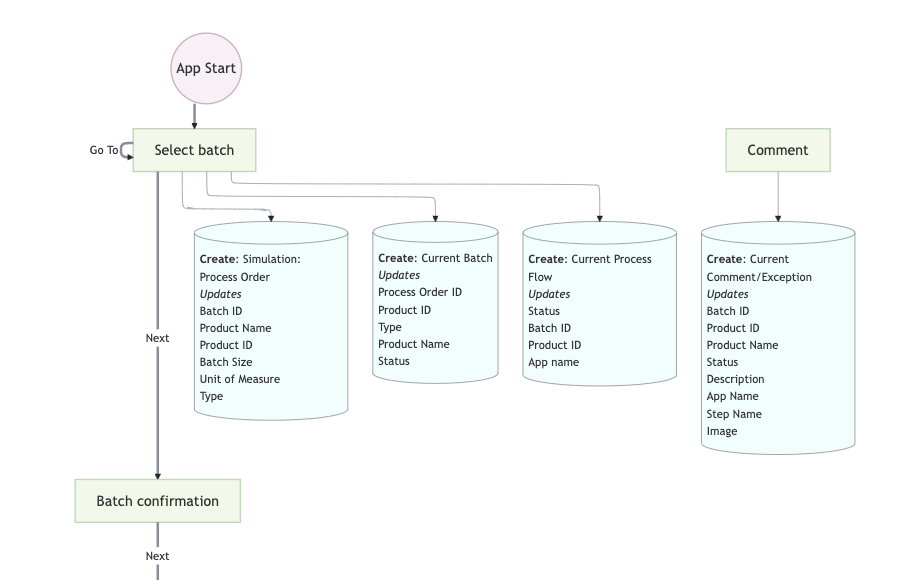
Building and maintaining Tulip apps just got easier. With App Diagrams, you can instantly generate a clear flowchart of a Tulip app — showing steps, triggers, transitions, table updates, and connector calls – natively, without 3rd-party tools.
Instead of manually documenting complex logic, App Diagrams provide an up-to-date blueprint that updates automatically as your app evolves. One customer in the Medical Device industry reduced the time needed to document apps by 10x, from 2-3 days to just 2-3 hours.
Whether you’re designing new workflows, troubleshooting existing ones, or handing off apps across teams and sites, App Diagrams give everyone the shared context they need to collaborate faster and smarter.
Enhanced Import/Export Supports Version Comparison
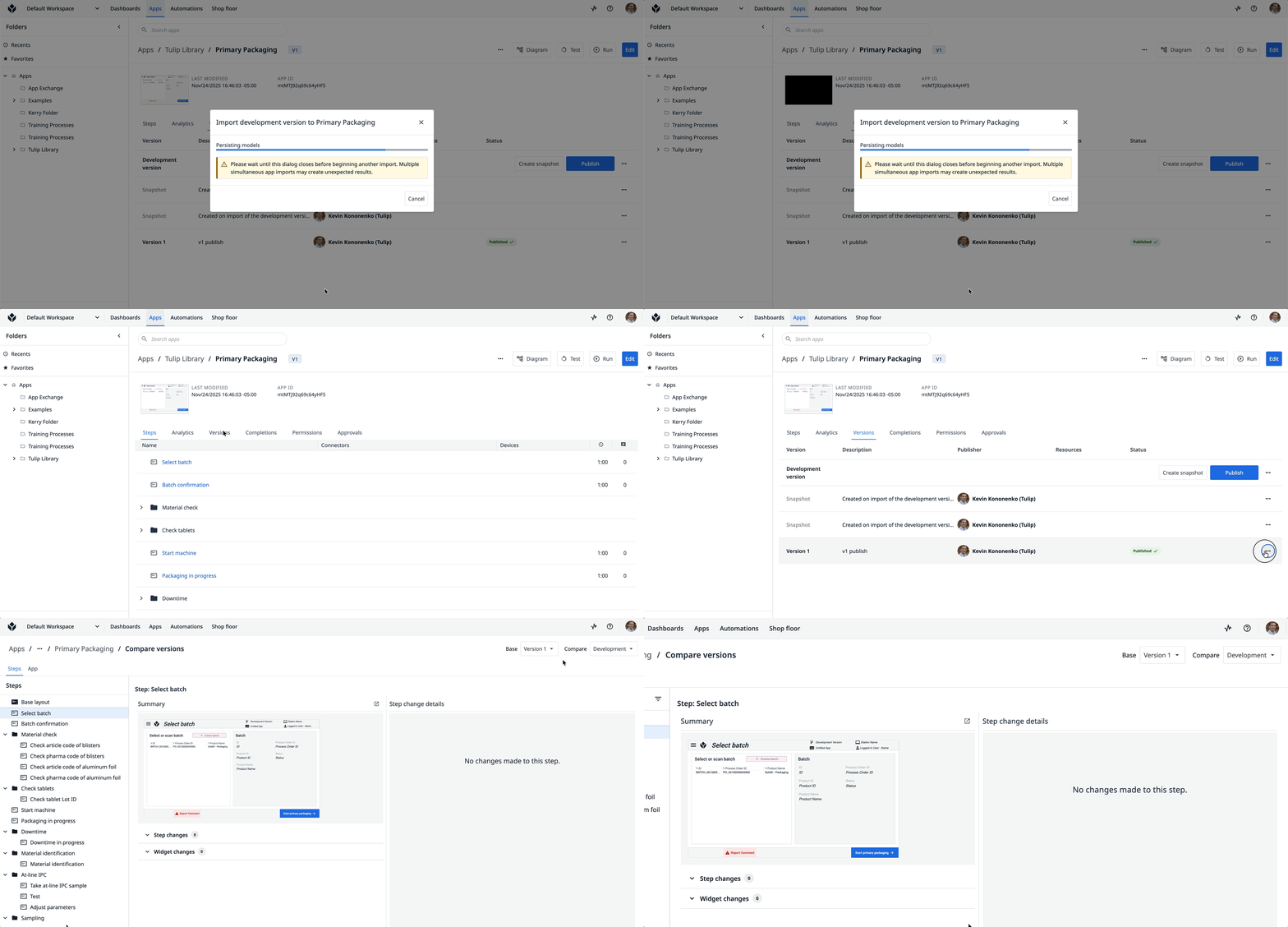
Streamline development-to-production workflows and shorten approval cycles. The enhanced Import/Export capabilities now allow you to compare versions of apps imported from other instances. Importing and exporting apps will also reduce duplication of table queries and aggregations. Whenever possible, Import/Export will reuse existing artifacts on the target instance.
Added Layers of Resilience
Reduce risk in environments with short periods of intermittent network connectivity to ensure data is captured and stored. LTS15 introduces multiple layers of resilience for table actions and triggers.
- Table Action Retries: Triggers will safely retry table actions (create, update, delete).
- Bundled Table Actions: Sequential table actions for (create, update) will be bundled for the same record to reduce the risk of partial errors.
- Enhanced Timeout Management: Improved trigger timeout behavior and user experience.
Automate Data Capture with Connected Workflows
Connect Equipment – No Middleware or Edge Devices Required
Imagine augmenting operator workflows with integrations with essential equipment – streamlining printing and scanning to maintain complete digital traceability, automating data capture to avoid manual transcription errors that risk compliance, and triggering actions to boost operator efficiency.
With pre-built edge drivers, you can connect your essential equipment, like printers, scales, sensors, torque devices, and lights, in minutes with minimal setup. Most devices with drivers in the Tulip Library are connectable via USB directly into the hardware running Tulip Player.
In LTS15, we’ve extended support for specialized protocols and enabled Windows Player for both new edge drivers and specialized protocols.
New Specialized Protocols
- Torque-OP for Player
- Multi Torque-OP for Player & Edge Devices
- SICS (Serial) [Available upon Request]
Newly Available on Windows Player
- Ohaus Scale for Player (library link, KB article)
Explore our library of 700+ devices, built in collaboration with our ecosystem partners for optimal reliability.
Explore Tulip’s library of edge drivers →
AI Prompt Actions in Automations
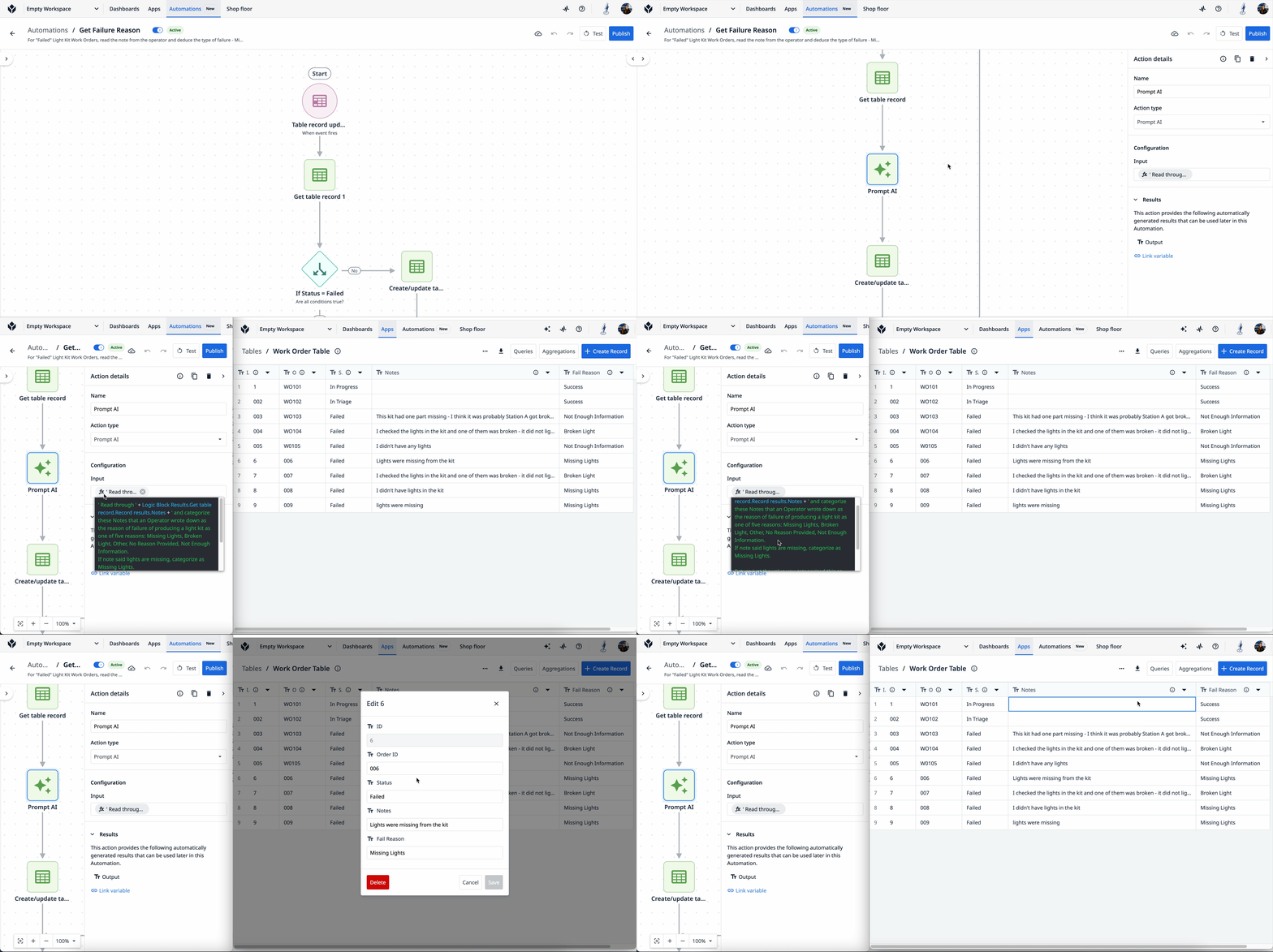
Enhanced Automations functionality with AI integration. Provide Tulip's AI model with clear written instructions and relevant data, and it will generate actionable insights.
Here are a few ways you can use the new AI Prompt Action:
- Generate comprehensive reports combining your shop floor data with data from all of your business systems.
- Classify defects and errors quickly and accurately by analyzing historical defect or inspection data.
Securely connect Generative AI to your operations with the Tulip MCP Server
The Tulip Model Context Protocol (MCP) Server acts as a secure bridge between Generative AI models and your Tulip instance. It allows authorized AI tools to read your manufacturing context and act on it through governed API permissions, turning AI into a practical extension of your operations without custom integration scripts.
Learn more about configuring the Tulip MCP Server →
Platform Enhancements and Improvements
Comprehensive platform updates spanning automations, user experience, and connector improvements
App Editing Experience Improvements
Trigger Editor Enhancements
- Clause Duplication: if/then clauses can now be duplicated
- Generate Trigger Summary - Enabled AI-generated trigger descriptions
- Variable Dropdown Improvements: Automatic scroll to current selection in trigger editor for easier navigation in large lists.
Enhanced Table Record Navigation
- Alphabetic Organization: The Records Pane now displays queries and aggregations in alphabetical order for each table, creating a predictable and organized structure.
- Comprehensive Search Functionality: The addition of search capabilities to the records pane enables faster filtering.
Enhanced File and Media Capabilities
- Camera Setting Controls: Image Input widgets can now disable camera controls for operators to ensure consistent camera settings and image quality.
- ZIP file upload support: When enabled by an Account admin, Operators can now upload ZIP files to Tables and file widgets.
Widget Enhancements
- Clear Translations: For apps with translations enabled, added a 'Delete Translations' button that allows users to clear existing translations when modifying widget text. This makes it easier to re-translate widgets after updating their content.
- Widget Control: New properties to allow widgets to be dynamically enabled and disabled.
- Interactive Table User Sort: User sort enabled for each column shown in interactive table widgets.
- Document Widget Support: Variables and Table record placeholders now available as data sources.
- Date Support in Table Record Widgets: Users can now select Date Created and Date Updated metadata fields.
Custom Widget Enhancements
Significant improvements to Custom Widget capabilities with enhanced device access and runtime options.
New Runtime Architecture:
Custom Widgets now supports an updated runtime environment offering an enhanced ability to connect seamlessly with external systems, Tulip APIs, and permissions (listed below)
Extended Device Access:
Extend your Custom Widgets with direct access to an array of device functionalities, including camera integration, microphone support, geolocation services, WebUSB Support, WebSerial Communication.
Connector and API Improvements
Extended Connector Integrations:
- Configure Quality of Service (QoS) levels for MQTT data sources: This improvement expands compatibility, allowing you to connect with MQTT brokers that require specific QoS configurations.
- Entra (Azure AD) Service Principal Secret Support for MS SQL database connectors: Users can now authenticate using their Entra (Azure AD) service credentials to authenticate with MS SQL Server. Read more here.
Connector Host Improvements:
- Send OPCH Logs to external logging tools: Logs such as connector host health, connector call execution and subscription logs can now be streamed to external logging tools (e.g. Splunk, DataDog, Graphana).
- Performance improvement on reporting machine events: Improvements to the efficiency of OPCH, reducing the CPU usage and memory consumption to make it faster and more reliable.
How do I learn more about LTS15?
If your team is interested in seeing all of the latest updates in LTS15, access the Tulip Docs or reach out to your Tulip contact for the official quality assurance report. Your customer success manager can also help you upgrade your instance to LTS15.
If you are interested in learning more or upgrading to LTS15, please contact your Customer Success Manager.