
Periodically, Tulip releases a new Long-Term Support (LTS) version of the platform for organizations in regulated environments. The latest version of Tulip, LTS17, introduces Functions in Beta, Enterprise App Exchange updates and app lineage, clearer SAML login troubleshooting, and support for larger deployments, empowering regulated manufacturers to scale composable solutions across every site.
For Tulip customers who are not subscribed to an LTS cycle, these features have rolled out weekly in our usual platform releases.
For more detailed notes on all the changes in LTS15, please log in to Tulip Docs.
See the LTS17 notes in Tulip Docs →
Reuse Logic Across Your Operations
Build Logic Once and Reuse It in Every App with Functions
With Functions (Beta in LTS17), your team can package trigger logic once and call it from any app in the workspace. When the logic changes, update the Function in one place instead of editing copied triggers across apps.
Functions are built in a visual editor, the same as Automations, with inputs and outputs, loops, conditionals, table actions, and connector functions. Test a Function with sample inputs before an app uses it.
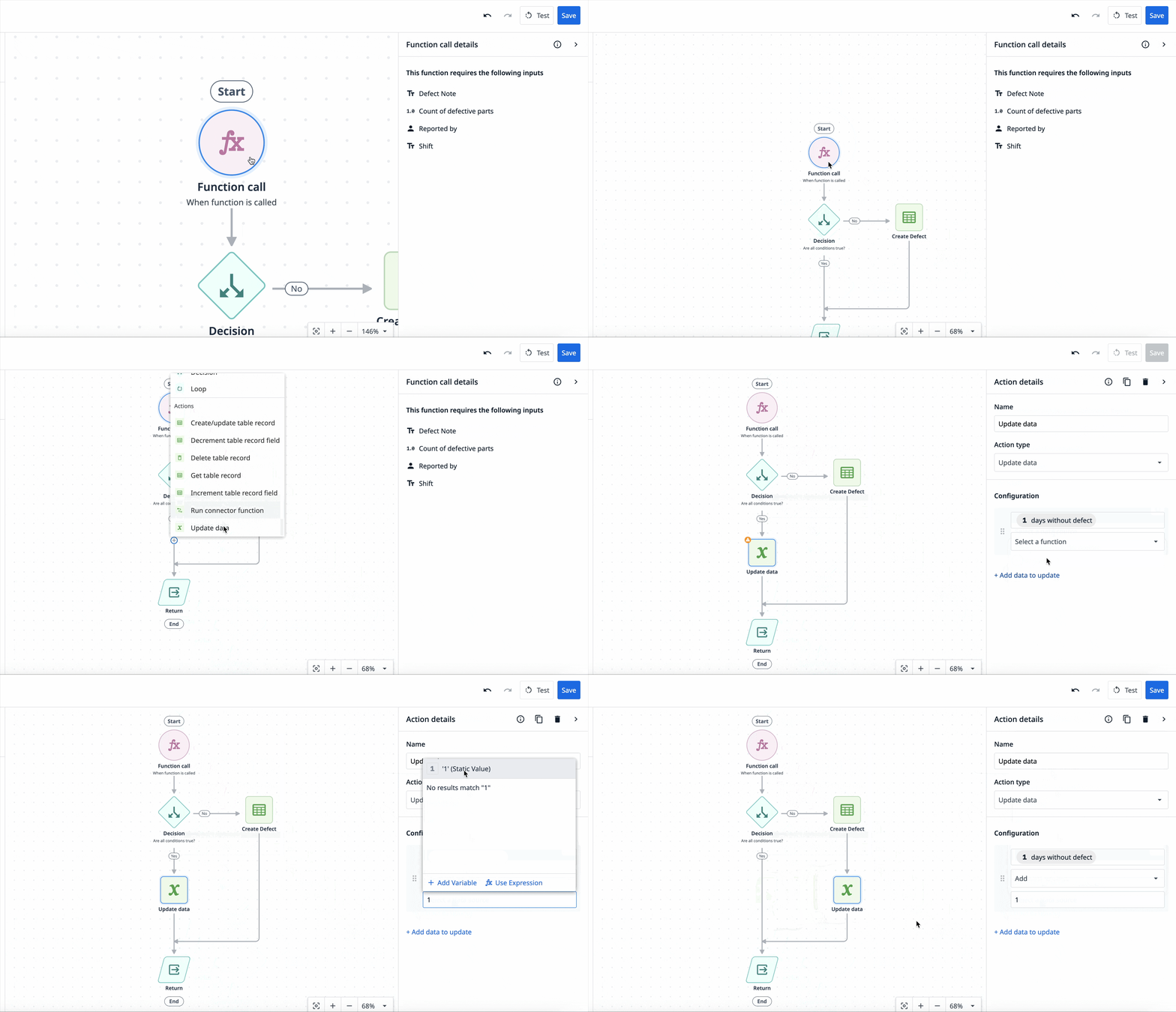
Govern Functions the Same Way You Govern Apps
Publishing an app saves a snapshot of the Functions it uses, so later edits to a Function do not change apps already in production. Custom User Roles (Enterprise plan) control who can create, edit, and archive Functions, who can view them, and who can test them.
Functions have been generally available on weekly releases since r380, and are available as opt-in Beta in LTS17. Contact your Customer Success Manager to have Functions enabled.
Read more about Functions governance →
Keep Every Site on the Latest Version
Update Enterprise App Exchange Apps in Line
Apps installed from the Enterprise App Exchange (EAE) were independent copies, so every update meant cloning, redeploying, and re-validating at each site. With LTS17, sites can see when a newer version of an adopted app is available and update it in line, so the new version arrives as the next version of the existing app. EAE is available on the Enterprise plan.
.gif)
- Updates view: A new Updates view on the Apps page lists installed apps that have a newer version available.
- Release notes: The Center of Excellence (COE) attaches release notes when publishing, so sites can review what changed before they update.
- Update in line: Installing an update adds the new version to the existing app instead of creating a duplicate.
- Safe to roll back: Users are warned before local edits are overwritten, and updating an app always saves a snapshot of the development version before installing, so a partly applied update can always be rolled back.
- Works without Workspaces: EAE settings are now available in instances that do not use Workspaces.
Know Where Every App Came From and Who Is on Which Version
App lineage records whether each app was built from scratch, cloned, installed from the Library, or imported, along with its installation chain (up to 10 ancestors). Lineage connects each installed app to its source, so sites can see when an update is available and update in place instead of re-importing. Lineage is tracked for new installs.
There is additional EAE functionality in OpsMoto, where the Enterprise Library tab shows install count, latest version, and each site's current version, so COE admins can identify which sites are not yet on the latest published version of an app.
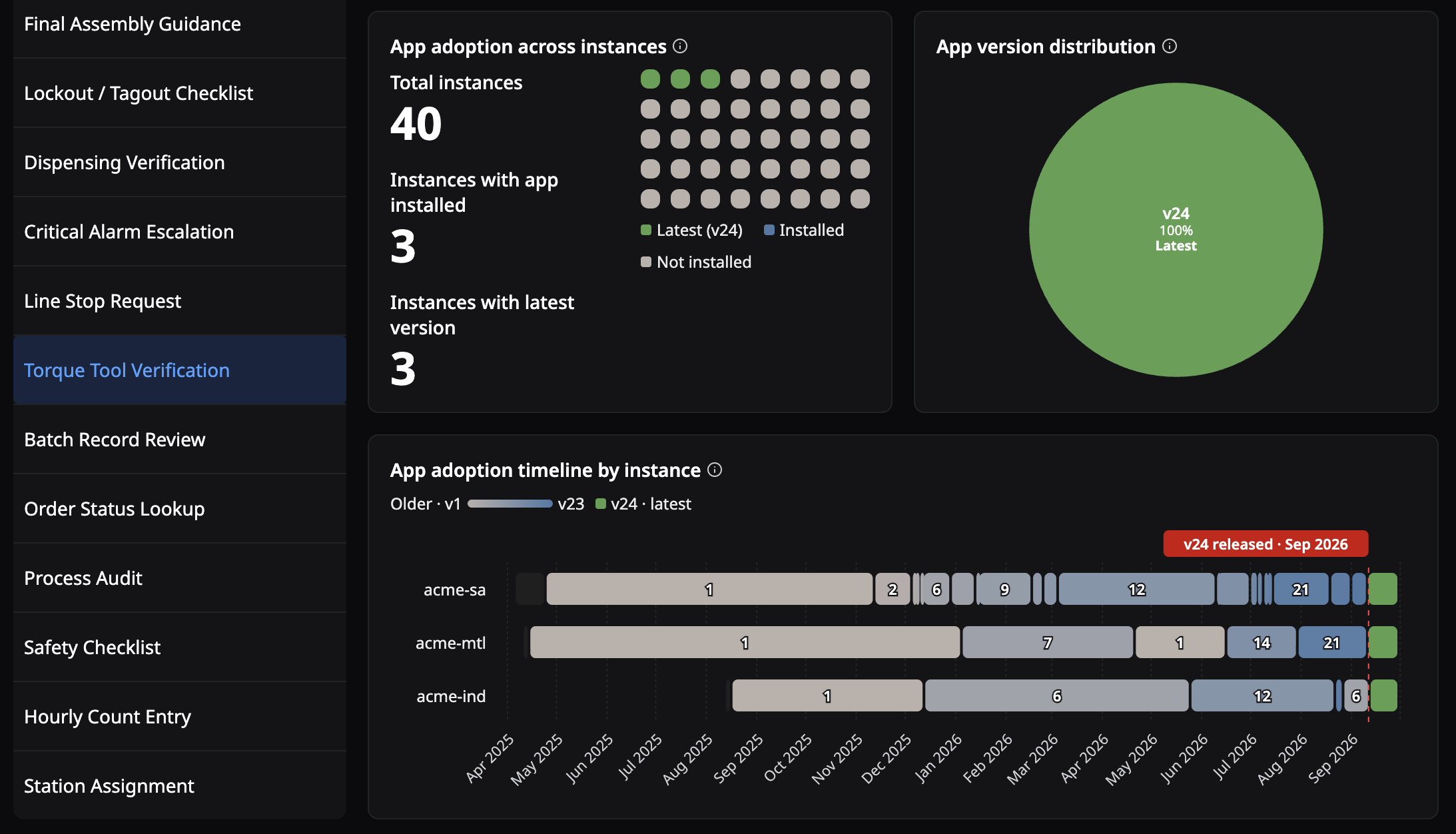
Faster Troubleshooting and Greater Control for Admins
Resolve SAML Login Issues Faster
Diagnosing a failed SAML login no longer requires a browser extension. When a login fails, the login form and the logs show what your identity provider sent, and admins have more control over where users go for help.
- Attributes on failed logins: The login form and logs show the user's Name ID, badge ID, and email.
- Clearer attribute conflict errors: If SAML tries to create or update a user whose badge ID or email address is already in use, the user sees a specific error message instead of a generic one.
- Internal IT contact: Admins can define a custom support email address on the SAML page in Account Settings, so when SAML login fails, users contact your internal IT team instead of Tulip Support.
- Safer migration: The SAML migration tool can now match users by badge ID when a user has no email address.
Scale to Larger Deployments
Station limits are now configurable per account through pricing configuration, with performance validated for large deployments on the Stations page and in the Player. Other accounts keep their current limits.
Strengthen Audit Trails and Credential Management
- Edge security event logging: Edge-owned operations (stations, interfaces, vision, edge module manager) now emit security event records. Compliance reviews now benefit from a more complete audit trail of edge configuration changes.
- Self-service OPCH credentials: Admins, and custom roles with Connectors access, can refresh On-Premise Connector Host (OPCH) credentials from Account Settings, under Connectors, without a Support ticket. Refreshing generates a new secret that is shown once, and the OPCH stays offline until it is restarted with the new credentials.
Notices
Plan Your Move Off Form Steps
As of LTS17 (r383), steps that use a form step show a banner in the App Editor with a Convert step button. The Convert step migration tool, available to all app builders in the App Editor, converts a form step into a regular step with equivalent input widgets and Submit and Cancel buttons. The tool does not provide exact replacements, so validate the migrated step before publishing. It only changes the development version of your app and does not edit a published version or delete the original form step. Going forward, use input widgets and e-signature, which offer richer functionality such as input validation.
Learn more about migrating form steps →
Users will no longer be able to create or edit form steps in LTS18.
Platform Enhancements
Comprehensive platform updates spanning app editing, automations, approvals, connectors, devices, and permissions.
App Editor and Trigger Improvements
- In the App Editor, clicking the app name now navigates to the App Overview page. Renaming an app and editing its description is now done with the pencil icon next to the name. Previously, clicking the app name opened the rename and description popover.
- The Interactive Table widget column picker now uses a searchable, multi-select checkbox dropdown with "Select all," so multiple columns can be added or removed at once.
- The dynamic enable/disable property is now available on checkbox, date picker, file upload, multiline, and image capture input widgets.
- Added a new trigger action: "Input Validation" > "Validate All Input Widgets". This action validates all input widgets on the step and displays errors for invalid fields, if applicable.
- Backend improvement to the app editor service. This update does not change the behavior of triggers or widgets, but includes the following minor improvements:
- Success and error notifications are clearer for undo, copy, cut, and paste.
- Default names are more consistent when copying, cutting, pasting, or duplicating widgets and triggers.
- Triggers are created on paste, instead of only on save, and appear immediately in the triggers list.
- When pasting triggers that contain translated text into apps without translations enabled, the user will see an error message.
- If a user alt-drags base layout widgets while not on the base layout step, only the widgets belonging to the current step are cloned and dragged.
Automations Enhancements
- Users can now add new table fields to existing "Get table record" actions in a Function or Automation.
- For Automations and Functions, improved the UX of updating the results for get table record actions to not clear references to still-valid output fields.
- Performance improvements for very large function traces, where rendering a few thousand traces caused the page to freeze.
- Invalid regular expressions in the function conditions "Matches Regular Expression" and "Doesn't Match Regular Expression" now surface specific, user-friendly errors. This change only applies to functions and automations.
App Publishing and Approvals
- The app publish modal now opens right away instead of waiting for all function and connector function issues to load. It shows a loading warning as issues are collected.
- On the pending-approval screen, a "Resend request" link lets users re-notify approvers who haven't yet responded to an app approval request.
AI and Agents
Available as an opt-in Beta.
- Role-based access control for AI agents is now available to all users. Users with the appropriate role permissions can access the agent builder and agent chat without an administrator turning on a setting first.
- The default Tulip AI agent in the Agent Chat widget can now search table records and read text from files and PDFs attached to table records. Note: reading file and PDF content requires document processing (embeddings) to be enabled on the table.
- Removed the "New" badge next to Tulip AI in the navigation bar.
Connectors and Connector Hosts
- In Connectors, OPC UA connector configurations can now be exported and imported alongside the other connector types.
- In the Connector Function Editor, file is now its own input type, separate from Image. Previously, sending non-image files required adding an Image input and switching it to File encoding. Now, you can add a File input directly and choose how it's sent (file URL, Base64, or multipart file) with image and file encodings handled independently end-to-end.
- Subdomains are now available for all HTTP connectors without a toggle. The subdomain field is always shown on the connector's configuration page. Each connector function can optionally use its own subdomain, and a connector-level default subdomain is applied to newly created functions.
- The connector status panel now shows two separate indicators for each connector environment: one for the Connector Host and one for the Server (the connection to your data source). This makes it easier to identify whether a connectivity issue is with the Connector Host or its connection to the data source. Status indicators also refresh automatically within a few seconds after editing a connector's configuration.
- Editing a connector configuration now shows a loading indicator while the configuration is retrieved, so changes made while loading are no longer lost.
- The "Show all data types" toggle on OPC UA data sources has been renamed to "Show all data types and nodes". Also, when enabled, nodes with different OPC UA types and nodes without a recognized type are now displayed.
- The connector host update banner now notes that LTS16 on-premise connector hosts (OPCH) changed their environment variables and links to the documentation, so users know to update their environment configuration when upgrading the OPCH.
- Backend improvement to connector function handling to prevent an edge case where a connector function could complete successfully without returning the result, causing an automation to report a timeout.
Tables, Data, and API
- The list table aggregations API endpoint now accepts optional
fieldandfnquery parameters to filter results to aggregations on a specific table field and/or using a specific aggregation function. - Backend improvement to how Tables create indexes for new columns. Indexes are now created automatically shortly after a column is added, instead of at the moment the column is created. This reduces load on the database when many columns are created.
Player, Stations, and Devices
- The Stations and Interfaces list pages now load faster in instances with large numbers of stations or interfaces.
- In the inactivity logout settings, the logout time selector is now available before you enable the setting. The setting description was also corrected to clarify that logout is enforced when the Player app is re-opened, if it was closed for more than 20 seconds.
- In the Player tab of Settings, account owners can now enable "Use OS default browser for authentication on desktop Player". When turned on, the Desktop Player launches the operating system's default browser to complete SSO/SAML login and OAuth connector authentication, rather than opening an embedded pop-up window inside the Player. This is useful for organizations whose SSO policies (e.g., Conditional Access, device trust, hardware-key, or passkey enforcement) rely on the system browser session. Operators can reuse an already-signed-in browser session for faster logins.
- The barcode scanner widget now detects inverted barcode (light or white codes on a dark background), in addition to standard dark-on-light codes.
- Torque Multi-Tool Open Protocol device driver is now available to all users.
Computer Vision
- The Vision Barcode Detector is now available for all customers.
IP Cameras are now available to all Vision customers.
Custom Widgets
- Added a control at the top of the Custom Widgets page that allows Account Owners to disable all access to Custom Widgets.
- Added enforcement where Custom Widgets options appear in the platform when the "Enable Custom Widgets" toggle is disabled. Users can still place, load, and import custom widgets within an app, but the ability to create a custom widget is removed.
- When editing a custom widget, the warning banner now clarifies that the widget is locked when used in a published or snapshotted app. Previously, the warning only mentioned published apps.
Access, Permissions, and Settings
- "API Tokens" have been renamed "Service Accounts" to avoid confusion with other API and authentication concepts that use the word "token".
- Service Accounts (formerly API tokens) can be granted a dedicated
attributes:writescope that controls writing values to machine attributes in Tulip. Separately, the scope required to report machine attribute values has been renamed from "attributes:write" to "attributes:report". Existing tokens are automatically migrated, so current integrations continue to work. - Errors (e.g. when logging in or registering an interface without the required role) now direct users to contact their Tulip administrator. Previously, users were shown a generic message.
Feature Deprecations
- On the Interfaces page, the option to specify custom registration identifiers has been removed. All registration identifiers are now auto-generated. Existing registration links (including any with custom identifiers) continue to work.
- The Live Chat option has been removed from the in-product Help menu. For support, continue to use the Support request option (email-based Zendesk tickets), which is unchanged.
- LTS15 on-premise connector hosts (OPCH) have entered their deprecation grace period (r377 through r382) on weekly releases. See On-Prem Connector Host Version Support for the full support timeline.
How do I learn more about LTS17?
If your team is interested in seeing all of the latest updates in LTS17, access the Tulip Docs or reach out to your Tulip contact for the official quality assurance report. Your customer success manager can also help you upgrade your instance to LTS17.
If you are interested in learning more or upgrading to LTS17, please contact your Customer Success Manager.