

Panoramica dell’articolo
- L’ambito di questo articolo riguarda i fondamenti dell’implementazione e della manutenzione di un modello di tabella Tulip che sia: performante, affidabile, componibile e scalabile.
- Lo scopo di questo articolo è fornire quanto segue:
- Raccomandazioni sull’utilizzo delle risorse delle tabelle della Tulip Library come punto di partenza per casi d’uso tipici
- Migliori pratiche per la progettazione di tabelle aggiuntive
- Creazione di query sulle tabelle ad alte prestazioni
- Pianificazione e implementazione di una strategia di archiviazione dei record delle tabelle
Destinatari: sviluppatori di app, architetti di soluzioni, architetti di dati, risorse delle piattaforme dati
Concetti chiave
- Le tabelle sono una componente fondamentale di qualsiasi soluzione Tulip e una delle numerose fonti di dati all'interno della vostra organizzazione.
- Un modello di tabella ben progettato consente di realizzare una soluzione performante, componibile e scalabile.
- Le risorse della Tulip Library offrono ai clienti un punto di partenza con un modello di dati comune.
- Le tabelle presentano alcune limitazioni: alcune sono intrinseche al loro design (ad esempio, la limitazione della frequenza) e altre derivano dalla pratica (ad esempio, le soglie relative al numero di record).
- Progettare query efficienti e archiviare i record più vecchi nelle tabelle ad alto volume (ad es. > 10 milioni di record) aiuta a mantenere una soluzione reattiva, supportando direttamente la produttività degli operatori e l’esperienza utente.
Posizione tipica di Tulip nel flusso di dati aziendale
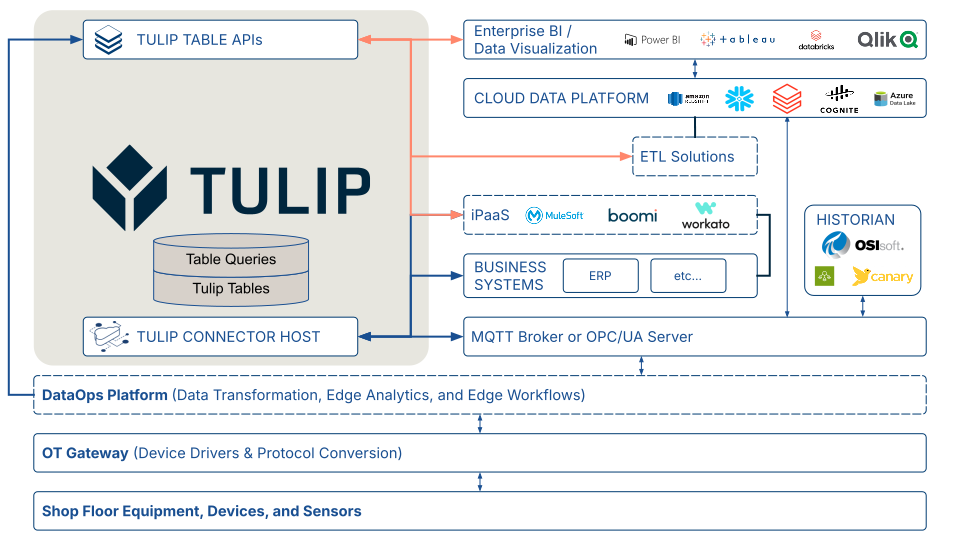
In quanto piattaforma operativa di prima linea progettata per fungere da pannello di controllo unico, la soluzione Tulip ospita dati critici di produzione e si integra con altre fonti di dati in tutta l’azienda. Si consideri il diagramma dell’architettura riportato di seguito. La soluzione Tulip può interagire con i sistemi aziendali tramite le funzioni di connessione (Connector Functions) e con le apparecchiature in officina tramite un broker MQTT o un server OPC UA configurato come Machine Data Source. Le vostre soluzioni iPaaS e ETL, nonché gli strumenti di visualizzazione dei dati aziendali, possono interagire con la vostra soluzione Tulip tramite le API delle tabelle.
Risorse Tulip per il modello di dati comune
Tulip mette a disposizione diverse risorse per accelerare lo sviluppo di soluzioni con un modello di dati comune basato sulle Tabelle. Per ulteriori informazioni, consultare:
Articoli aggiuntivi sul modello di dati comune
- Modello di dati comune
- Esempio: utilizzo del modello di dati comune per casi d’uso discreti
- Esempio: utilizzo del modello di dati comune per casi d'uso nel settore farmaceutico
Risorse della Libreria Tulip sul modello di dati comune
- Kit di base del modello di dati comune di Tulip{
target=_blank} - Kit di tabelle
Ottimizzazione delle tabelle per la scalabilità
Migliori pratiche per la progettazione di tabelle scalabili
Le tabelle presenti nel Modello di dati comune della Libreria Tulip sono costruite sulla base delle migliori pratiche descritte di seguito. Queste tabelle — e i principi su cui si fondano — fungono da guida pratica per la progettazione di tabelle che rimangano scalabili e utilizzabili nella logica di Tulip nel lungo periodo.
Rendere le tabelle scalabili orizzontalmente (alte anziché larghe).
Si consideri una tabella della distinta base (BOM). Un nuovo sviluppatore di app Tulip potrebbe essere incline a creare una tabella "larga" con una colonna "Numero" separata per ogni componente di un assemblaggio. Sebbene ciò possa sembrare semplice nel breve termine, complica rapidamente il riutilizzo delle query, appesantisce la logica dei trigger e limita l’applicabilità della tabella ad altri assemblaggi.
Nella tabella della distinta base (BOM) riportata di seguito, le colonne rappresentano il genitore e il componente di un assemblaggio. Se un assemblaggio ha cinque componenti, la tabella contiene cinque record. Questa struttura supporta una gerarchia a n livelli, poiché un sottoassemblaggio può fungere da “Genitore” in una relazione e da “Componente” in un’altra.
Si noti inoltre che il design di questa tabella è indipendente sia dal prodotto che dal settore: potrebbe memorizzare la distinta base per qualsiasi cosa, da un pasto a un aereo commerciale.
Struttura consigliata per una tabella della distinta base| Etichetta | Tipo di campo | Descrizione || --- | --- | --- || ID | Testo | Obbligatorio: identificatore univoco || ID definizione materiale padre | Testo | Identificatore univoco della definizione del materiale padre dell’assieme|| Descrizione del materiale padre | Testo | Descrizione del materiale padre || ID definizione materiale componente | Testo | Identificatore univoco della definizione del materiale componente || Descrizione del materiale componente | Testo | Descrizione del materiale da assemblare o consumare || Quantità componente | Numero | Quantità del materiale da assemblare o consumare || Unità di misura componente | Testo | Unità di misura del componente || Punto di utilizzo | Testo | Luogo, operazione o fase in cui il materiale verrà assemblato o consumato |
Evitare tabelle molto larghe
Sebbene la piattaforma Tulip supporti fino a 200 colonne, una tabella che superi circa le 50 colonne potrebbe indicare la necessità di riconsiderare il modello di dati sottostante ai fini della scalabilità a lungo termine.
Evitare di memorizzare troppe "cose" distinte in una singola tabella
In questo contesto, per “elemento” si intende un tipo di entità di dati specifico per un caso d’uso. Ad esempio, una tabella “Attrezzature e beni” potrebbe contenere informazioni sia sulle attrezzature di officina che sugli strumenti che richiedono il monitoraggio della calibrazione. Sebbene possa essere pratico memorizzare diversi tipi di entità nella stessa tabella, ciò è più appropriato quando:
- L’utilizzo dell’ID record è coerente tra i diversi tipi di entità.
- Nell’esempio delle «attrezzature di officina» e degli «strumenti calibrati», l’ID del record corrisponde solitamente al codice di inventario aziendale.
- I diversi tipi di entità condividono circa il 50% o più delle stesse colonne.
- Se i diversi tipi di entità condividono pochissime colonne, è probabilmente più opportuno memorizzarli in tabelle separate.
- Non esiste una relazione uno-a-molti tra i tipi di entità.
- Ad esempio, un lotto può contenere molti ordini di lavoro. Anche se gli ordini di lavoro e i lotti condividono più del 50% delle stesse colonne — e la colonna ID funge sia da ID ordine di lavoro che da ID lotto — la relazione uno-a-molti tra di essi può complicare la progettazione delle query e la logica dei trigger, dando luogo a un modello di tabelle poco intuitivo sia per chi sviluppa soluzioni che per chi utilizza i dati.
- Consenso tra le parti interessate.
- Gli sviluppatori della soluzione e gli utenti dei dati concordano generalmente sul fatto che i diversi tipi di entità siano fondamentalmente simili (ad es. «attrezzature di officina» e «strumenti calibrati»).
Limiti pratici delle tabelle
Limiti di frequenza
Tulip applica limiti di frequenza alle risorse per garantire un’esperienza coerente e affidabile agli utenti per quanto riguarda:
- Scritture di record
- Cancellazioni di record
Per saperne di più sui limiti di velocità delle tabelle, clicca qui.
Limiti al numero di record
La piattaforma Tulip non impone un limite rigido al numero di record in una tabella; tuttavia, esiste un limite pratico che dipende dall’utilizzo della tabella. Con l’aumentare del numero di record, è comune osservare un calo delle prestazioni nelle query e nelle aggregazioni, che può influire sull’affidabilità delle app, sull’esperienza degli operatori e sulla produttività in produzione.
Esistono casi documentati di applicazioni di produzione dei clienti Tulip che operano su tabelle con oltre 10 milioni di record, con un impatto trascurabile sulle prestazioni attribuibile esclusivamente al numero di record.
Ottimizzazione delle tabelle per affidabilità e prestazioni
Ridurre al minimo l’uso dei record collegati
Nelle versioni precedenti della piattaforma Tulip, le tabelle con più colonne di record collegati e oltre un milione di record presentavano significativi problemi di prestazioni. I miglioramenti apportati alla piattaforma hanno risolto in gran parte questo problema, ma rimane comunque una best practice ridurre al minimo o mitigare l’uso dei record collegati per diversi motivi:
- Prestazioni su larga scala
- Estrazione dei record delle tabelle tramite API o download CSV
- Limitazioni note delle funzionalità (ad esempio, impossibilità di filtrare una tabella interattiva incorporata in base a una colonna di una tabella collegata)
Creazione di query performanti
Le prestazioni delle query dipendono dal tipo o dai tipi di filtro utilizzati
| Tipo di filtro | Prestazioni su larga scala | Note |
|---|---|---|
| uguale a | Da buona a eccellente | Eccellente per la corrispondenza esatta nelle colonne di testo. Utilizzare i filtri "uguale a" ogni volta che è possibile, preferendoli ad altri tipi di filtro. |
| inizia con | Buono | |
| è presente in | Da discreto a buono | Ideale con un elenco breve (< 10 elementi). Le prestazioni diminuiscono all'aumentare dell'elenco. |
| è nullo | Da discreto a moderato | Le query che si basano esclusivamente su questo filtro possono risultare lente se la maggior parte dei record presenta valori nulli nella colonna. |
| non è nullo | Da discreto a moderato | Al contrario, se la maggior parte dei record è null, questa query può restituire i risultati molto rapidamente. |
| termina con | Da discreto a moderato | Non distingue tra maiuscole e minuscole. Le prestazioni diminuiscono con limiti di risultati elevati e un numero elevato di record. |
| contiene | Da discreto a moderato | Non distingue tra maiuscole e minuscole. Le prestazioni diminuiscono con limiti di risultati elevati e un numero elevato di record. |
| non è uguale a | Da scarsa a discreta | |
| non è presente in | Da scarso a discreto | |
| non inizia con | Da scarso a discreto | |
| non finisce con | Da scarso a discreto | |
| non contiene | Da scarso a discreto |
Le prestazioni delle query dipendono dal numero di filtri
Quando si progettano le query, è bene cercare il giusto equilibrio: un numero sufficiente di filtri per ottenere risultati precisi, pur mantenendo la query riutilizzabile in casi d’uso simili. È raro che siano necessari più di tre o quattro filtri.
If you are building a query with many filters, it may indicate that your table model lacks scalability and would benefit from a partial redesign.
Impostare sempre un limite appropriato per la query
Imposta un LIMIT su ogni query, utilizzando il valore minimo che soddisfi il tuo caso d'uso:
- Verifica dell’esistenza di almeno un record corrispondente: 1 record
- Reportistica: valutare l’utilizzo di Analytics
- Altri casi d’uso: considera il numero massimo pratico di record che verrebbero recuperati o valutati in base ai filtri di query utilizzati e usa quel numero come LIMIT (se inferiore a 1.000).
Perché è importante:
una query che utilizza il limite predefinito di 1.000 tenterà di recuperare fino a 1.000 record corrispondenti, anche quando ne servono solo pochi. Limiti inutilmente elevati consumano tempo e risorse in casi d’uso in cui sarebbe sufficiente un insieme di risultati più piccolo.
Nozioni fondamentali sulla strategia di archiviazione dei record delle tabelle
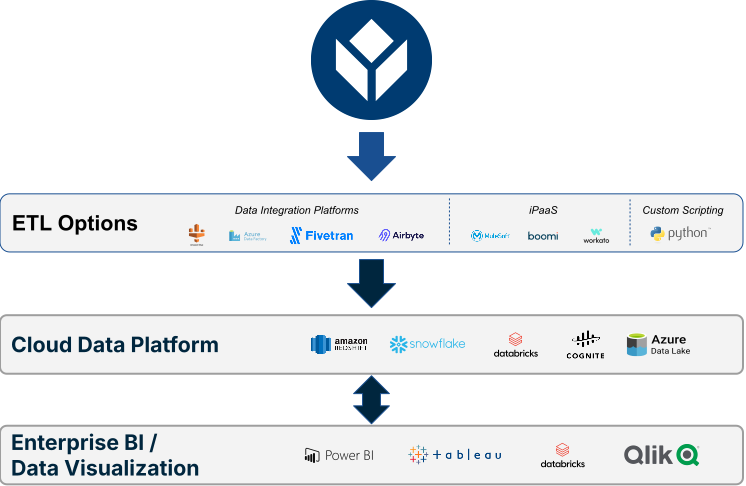
Ai fini di questa discussione, per “archiviazione” si intende il processo di estrazione dei record da una o più tabelle, il loro caricamento in una piattaforma dati cloud tramite una soluzione ETL (ad es. un iPaaS o una piattaforma di integrazione dei dati), per poi eliminarli dalle tabelle.
Contesto e raccomandazioni
- Tulip non impone un limite rigido al numero di record che possono risiedere nelle tabelle.
- Tulip raccomanda di mantenere il numero di record nelle singole tabelle a pochi milioni o meno, poiché le prestazioni delle query possono peggiorare all’aumentare del numero di record.
- I problemi di prestazioni sono aggravati dall’uso di record collegati e da query mal progettate.
Raccomandazione:
Mantenere il numero di record delle tabelle al di sotto dei 10 milioni spostando periodicamente i record più vecchi su una piattaforma dati cloud.
Pianificazione e implementazione dell’archiviazione dei record delle tabelle
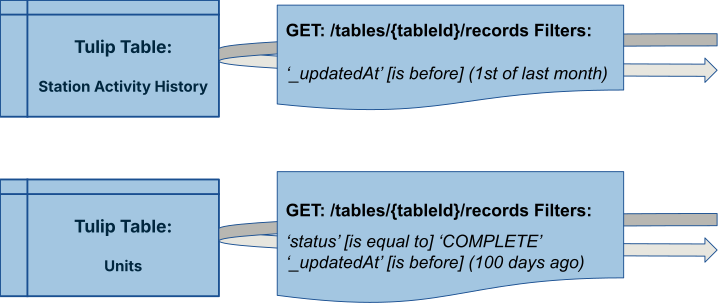
- Definire i criteri di archiviazione: determinare i filtri di query che identificano i record idonei all’archiviazione in ciascuna tabella.
- Esempio: per una tabella denominata “Cronologia stato stazioni”, si potrebbero archiviare tutti i record con data precedente al primo del mese precedente.
- Identificare la destinazione: selezionare la piattaforma dati cloud di destinazione (ad es. Redshift, Snowflake, Databricks, ecc...).
.svg)
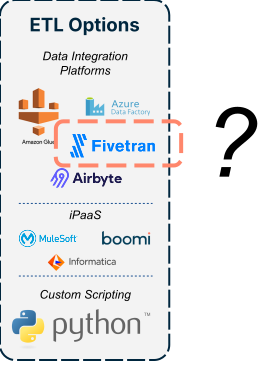
- Selezionare una soluzione ETL — scegliere una piattaforma di integrazione dati, un iPaaS di terze parti o uno script Python personalizzato per eseguire lo spostamento dei record.
- Esegui una migrazione iniziale in blocco: sposta tutti i record che soddisfano i criteri definiti nel passaggio 1 verso la destinazione identificata nel passaggio 2, in batch.
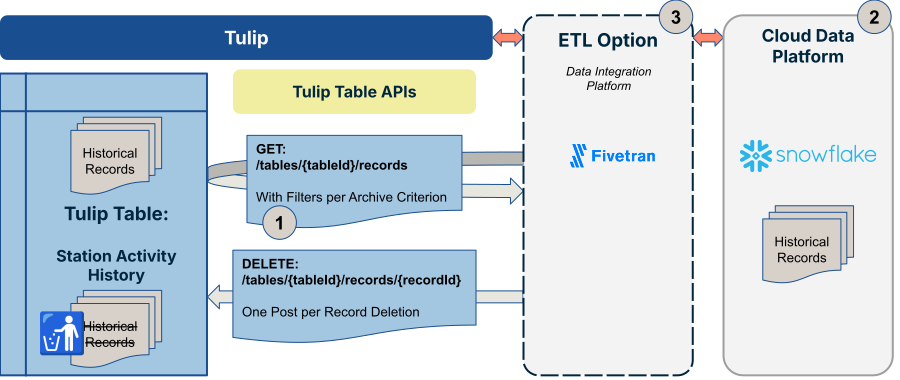
- Pianifica migrazioni incrementali ricorrenti: imposta un processo automatizzato per eseguire spostamenti simili di record su base continuativa. Una best practice comune consiste nell’eseguire tali spostamenti di record con frequenza molto elevata, ad esempio ogni 15 minuti per le tabelle aggiornate nel corso di una tipica giornata lavorativa.
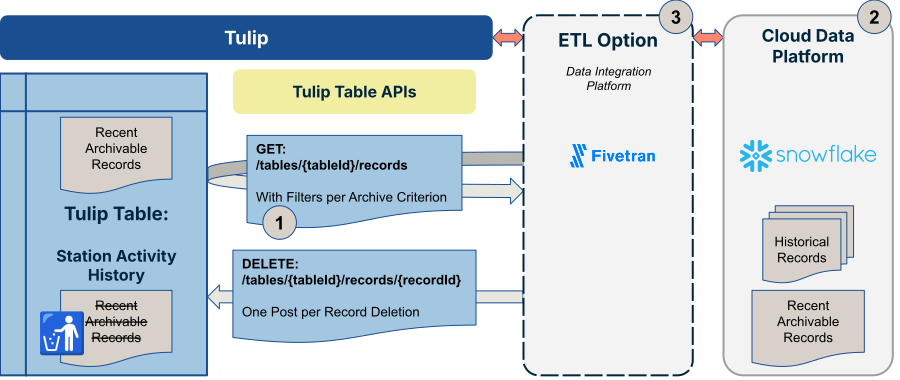
Per indicazioni più dettagliate sui punti 4 e 5, consultare la sezione “Best practice sull’archiviazione dei record delle tabelle” riportata di seguito.
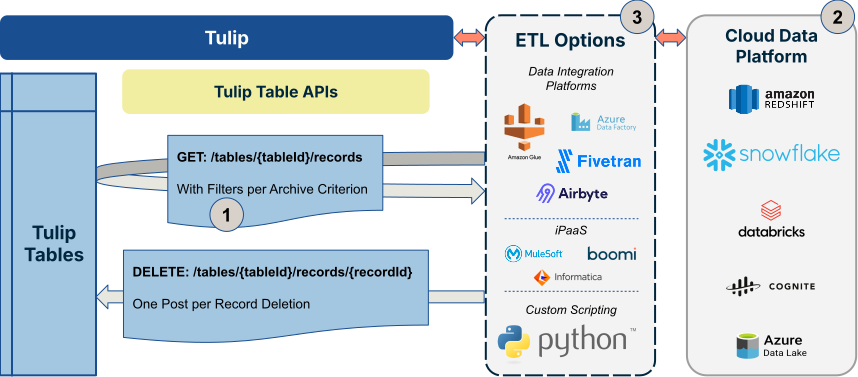
Risorse aggiuntive sulle opzioni ETL:
- Piattaforme di integrazione dei dati
- Fivetran
- Microsoft Fabric
- Piattaforme dati cloud
- Snowflake
- Cognite
Migliori pratiche per l'archiviazione dei record delle tabelle
Utilizzare il numero di sequenza come cursore
Quando si esegue la paginazione dei record, utilizzare il numero di sequenza come cursore anziché la paginazione basata sull'offset.
Perché la paginazione basata sull'offset non funziona: se i record vengono inseriti o aggiornati mentre è in corso la sincronizzazione, la paginazione basata sull'offset può saltare o duplicare i record. I cursori basati sul numero di sequenza sono stabili: sequenceNumber > last_seen_seq fornisce sempre la pagina successiva corretta, indipendentemente dalle scritture simultanee.
La sincronizzazione di una tabella avviene in due fasi: un caricamento in blocco una tantum per caricare tutti i record storici, seguito da migrazioni incrementali ricorrenti per acquisire le modifiche. Entrambe le fasi dovrebbero utilizzare il numero di sequenza come cursore.
Caricamento in blocco iniziale seguito da migrazioni incrementali
Prima di eseguire le sincronizzazioni incrementali, effettuare un caricamento in blocco una tantum, ovvero un caricamento completo di tutti i record storici. Ciò fornisce alla destinazione una linea di base completa.
Procedura:
- Inizia con
last_seq = 0(o l’ultimo checkpoint salvato se si riprende un caricamento in blocco interrotto) - Recuperare le pagine ordinate in ordine crescente per numero di sequenza
- Scrivere ogni pagina nella destinazione
- Salvare un checkpoint ogni ~500 record
- Interrompere quando una pagina non restituisce alcun record
Rispettare i limiti di velocità e utilizzare il backoff esponenziale
L'API Tulip Tables applica limiti di velocità a tutte le richieste. Per gestire correttamente questa situazione, esistono due livelli di approccio:
Limitazione proattiva — distanziare le richieste per rimanere entro il limite sin dall’inizio, anziché attendere di essere respinti
Backoff reattivo — quando si riceve un codice di errore 429 nonostante la limitazione (ad esempio a causa di altri processi concorrenti che condividono la stessa quota API dell’area di lavoro), ridurre la frequenza delle richieste GET e riprovare.
Consultare la guida ai limiti di velocità dell’API di Tulip per conoscere i limiti attuali. Non codificare in modo rigido i valori dei limiti nella soluzione ETL: utilizzare una costante denominata in modo che siano facili da aggiornare se i limiti cambiano.
Escludere i campi dei record collegati utilizzando il filtro «Fields»
Le tabelle supportano i campi di record collegati (tipo tableLink): campi in una tabella che fanno riferimento a record presenti in un’altra. Quando un campo tableLink è incluso in una risposta di record, l’API di Tulip deve risolvere tali riferimenti lato server, il che genera query a cascata sul database. Nelle tabelle con molti campi collegati o con un numero elevato di record, ciò comporta un carico significativo sul database e influisce su tutti gli utenti dell’area di lavoro.
La soluzione: utilizzare il parametro di query fields per elencare esplicitamente i campi che si desidera restituire ed escludere completamente i campi tableLink. Ciò richiede un piccolo sforzo iniziale — è necessario recuperare prima lo schema della tabella per sapere quali campi includere — ma è l’approccio corretto e si traduce in query più veloci e leggere.
Ripristino dagli errori basato su checkpoint
Si verificheranno interruzioni di rete, timeout ed errori imprevisti. Progetta il tuo connettore in modo che si riprenda correttamente senza dover ricominciare da zero.
Modello:
- Salvare l’ultimo numero di sequenza elaborato con successo in un archivio persistente ogni ~500 record
- Al riavvio, caricate il checkpoint e riprendete da seq > checkpoint_seq
- Scrivere i record utilizzando la logica upsert (anziché insert) nella destinazione, in modo che la rielaborazione dei record dal checkpoint sia sicura
Gestione dell’eliminazione dei record
L'API delle tabelle Tulip non fornisce un flusso di eventi di eliminazione. Se un record viene eliminato definitivamente in Tulip, il connettore non ha modo di rilevarlo: il record scompare semplicemente dall'API senza alcuna notifica. Il modo in cui gestire questa situazione dipende da ciò che si desidera che faccia la destinazione esterna.
- Scenario A: mantenere la destinazione sincronizzata con Tulip (rispecchiare le eliminazioni)
- Se l’obiettivo è che la destinazione rifletta lo stato attuale di Tulip — comprese le eliminazioni — allora non eliminare definitivamente i record in Tulip. Il connettore non può propagare un’eliminazione che non vede mai.
- Aggiungi invece alla tabella una colonna booleana — “archiviato” o “eliminato” — e impostala su “true” quando un record deve essere trattato come inattivo. Trattandosi di un aggiornamento del campo, la successiva sincronizzazione incrementale lo rileverà e lo scriverà automaticamente nella destinazione, senza che sia necessaria alcuna logica speciale da parte del connettore. Potrai quindi filtrarli nella destinazione.
- In Tulip: aggiungere una colonna booleana “archiviato” e aggiornarla tramite l’app, una funzione o un’automazione quando il record deve essere trattato come “inattivo”, anziché eliminarlo.
- Nella destinazione: filtrare in base a
archived \= falsenelle query e nei report, anziché dare per scontato che tutti i record sincronizzati siano attivi.
- Scenario B: ripulire Tulip per migliorare le prestazioni, conservando i record nella destinazione
- Le tabelle di Tulip offrono prestazioni migliori se mantenute snelle. Se una tabella diventa molto grande, l’eliminazione definitiva dei record vecchi o completati è un modo valido per gestirne le dimensioni — ad esempio, archiviando gli ordini di lavoro completati dopo un periodo di conservazione.
- In questo scenario, l’eliminazione definitiva in Tulip va bene. Poiché il connettore non riceve mai un evento di eliminazione, i record rimossi da Tulip semplicemente non vengono più aggiornati nella destinazione: vengono conservati così come sono. La destinazione diventa un archivio a lungo termine mentre Tulip mantiene le sue prestazioni.
- Per questo modello non sono necessarie modifiche al connettore. È sufficiente assicurarsi che i consumatori a valle comprendano che la destinazione potrebbe contenere record che non esistono più in Tulip e progettino le loro query di conseguenza (ad esempio, eseguendo un join sul timestamp
completed\_atanziché presumere che il record sia ancora attivo in Tulip).
Approfondimenti
- Ulteriori indicazioni su questo argomento sono disponibili nella Community di Tulip in questo thread: Approcci e best practice per il connettore delle tabelle Tulip - Lavorare con Airbyte, FiveTran e altri strumenti ETL
- Webinar Tulip - Tabelle pulite, app veloci: una guida per gli sviluppatori di app all’ottimizzazione del modello di dati{
target=_blank}
{{snippet.Hai trovato quello che cercavi?}}