Here are the questions you need to ask if you are interested in using machine monitoring with Tulip.
If you want to build a frontline operations app that uses data from both humans and machines, Tulip could be a great fit for your production floor.
For example, if you want your operator's app to use dynamic logic based on whether a machine is running or not, Tulip can help. Or, if you just want to collect machine data alongside human data for later analysis, Tulip can also help.
To determine which machine data can be integrated into Tulip, you will need to know the following information:
- What protocol does the device use to share data?
Common examples include OPC UA, MQTT, MTConnect and Modbus. - What does your current data infrastructure look like?
For example, do you have a SCADA system, historian, or Kepware server that already aggregates machine data? Many scalable integrations connect Tulip to that layer rather than directly to each machine. - If you are currently capturing data from the machine, where is it located?
And what is the format?
Tulip uses Connectors to work with external software and hardware. In addition to the standard HTTP and SQL Connectors, Tulip's Machine Monitoring module adds the capability to connect to machine protocols through the OPC UA Connector and the MQTT Connector.
Once you integrate your machine data into Tulip, you can combine it with human input in Tulip's App Editor.
Tulip system connections
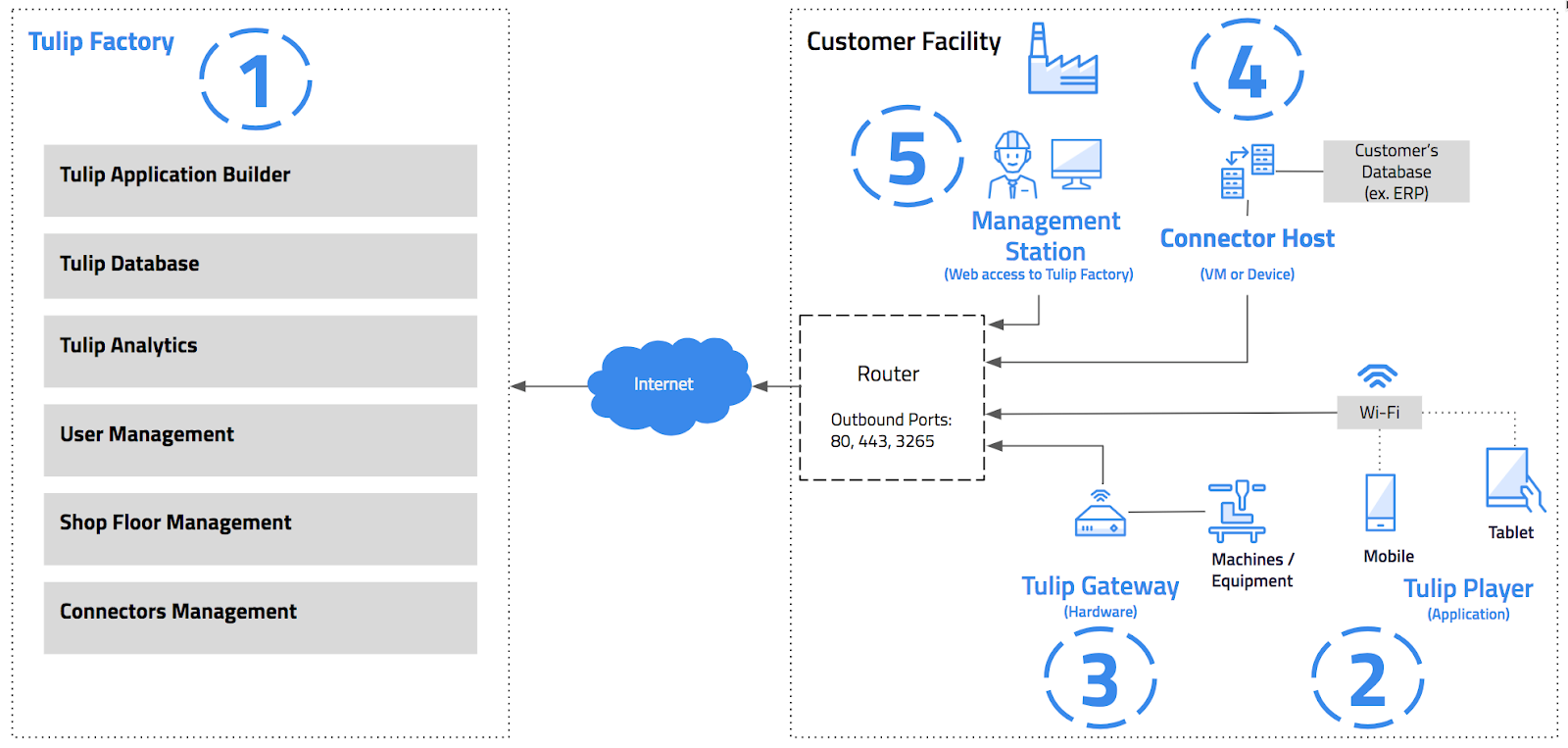
See the Tulip platform components and network diagram to understand how the Tulip system works.
Common connection scenarios
If you want to connect Tulip to a device on the Shop Floor, you first need to consider how you will connect the device to your company’s data infrastructure, either on-premises or in the cloud.
The most scalable architectures connect Tulip to an existing data aggregation layer rather than directly to individual machines. The most common scenarios are:
- A machine connected via a SCADA system, historian, or Kepware server: If your facility uses a SCADA system or an OPC aggregation platform like Kepware, Tulip can connect to that layer via OPC UA or HTTP. This approach scales well across large machine estates without requiring per-machine configuration.
- A machine with a native API: Many modern machines expose HTTP or MQTT interfaces directly. Tulip can connect to these via the HTTP Connector or MQTT Connector for a direct, lightweight integration.
- A machine that publishes to an MQTT broker: If your facility uses an MQTT broker (including cloud brokers such as AWS IoT Core), Tulip's MQTT Connector can subscribe to topics from that broker and route data into your apps and machine monitoring dashboards. This is a common pattern in facilities using a Unified Namespace (UNS) architecture.
- An older machine connected to a Tulip Edge Device: For legacy equipment without network connectivity, a Tulip Edge Device can bridge the gap via serial port, USB, or GPIO. This is a valid approach for isolated or legacy machines, but is not preferable for larger-scale deployments.
The types of data that can be accessed in Tulip depend on the machine's method for sharing data. Tulip can capture simple facts like whether the machine is on or off, or more advanced metrics like spindle speed or operation pressure.
Connect via MQTT
MQTT is a lightweight, publish/subscribe protocol widely used in industrial IoT environments. If your machines or SCADA layer publish data to an MQTT broker, you can connect Tulip to that broker using the MQTT Connector.
Here are the important things to note about MQTT Connectors:
- Tulip supports both MQTT (username/password authentication) and MQTTs (MQTT over TLS/SSL, with support for private keys, certificates, and trusted CA tokens).
- The connector runs on a Connector Host. If your MQTT broker is not accessible from the public internet, you need an On-Premise Connector Host (OPCH) (version 261 / LTS11 or higher).
- Tulip supports publishing data back to your MQTT broker from within apps, making it possible to trigger downstream systems or update a Unified Namespace. This requires an On-Premise Connector Host (OPCH) running LTS13 or higher.
- Quality of Service (QoS) is configurable at the connector level: QoS 0 (at most once), QoS 1 (at least once), or QoS 2 (exactly once).
For setup instructions, see Build your first MQTT connector and Configure an MQTT connector functions.
Data flow overview
There are three major steps in the data flow from machine to Tulip’s apps.
- The machine shares data via a protocol.
- Your data infrastructure (SCADA system, historian, MQTT broker, or machine API) stores or routes the data.
- The Tulip Connector Host receives the data and shares it with the rest of the Tulip platform.
The machines usually push data into your company’s servers. And then your company’s servers push data into Tulip’s Connector Host when certain events occur.
Here’s a diagram of that flow.

Once the data has reached Tulip, you can use Connectors to pass it into apps, machines, widgets, and live charts via the Analytics Editor, then share those views with your team using dashboards.
Further reading
- Intro to Machine Monitoring in Tulip
- Build your first MQTT connector
- Build your first OPC UA data source
- Overview of Tulip Connector Hosts
Did you find what you were looking for?
You can also head to community.tulip.co to post your question or see if others have solved a similar topic!