This guide outlines best practices for designing high-performance Tulip applications that scale efficiently in production environments. Following these recommendations will help ensure your apps remain responsive and stable, even as your operation scales.
The recommendations in this article apply wherever your solutions include the use of Connector Functions to the Tulip API. These include:
- Connector Function runs or API Calls on App Level Triggers (timer, button, step enter, e.g.)
- API calls from Node RED
- Scripts with API calls originating outside of Tulip solutions
- Writes to Tulip Tables using the Table API from other systems
What is a high-frequency trigger?
A high-frequency trigger executes more often than every 5 seconds (faster than 0.2 Hz). Machine attribute events, device events, and timer triggers are the most common sources of high-frequency execution.
Tulip recommends that triggers execute no faster than 5 seconds (0.2 Hz) to maintain app performance and responsiveness.
Trigger queue impact
App triggers execute top-down in a sequential single-threaded queue, known as the trigger queue.
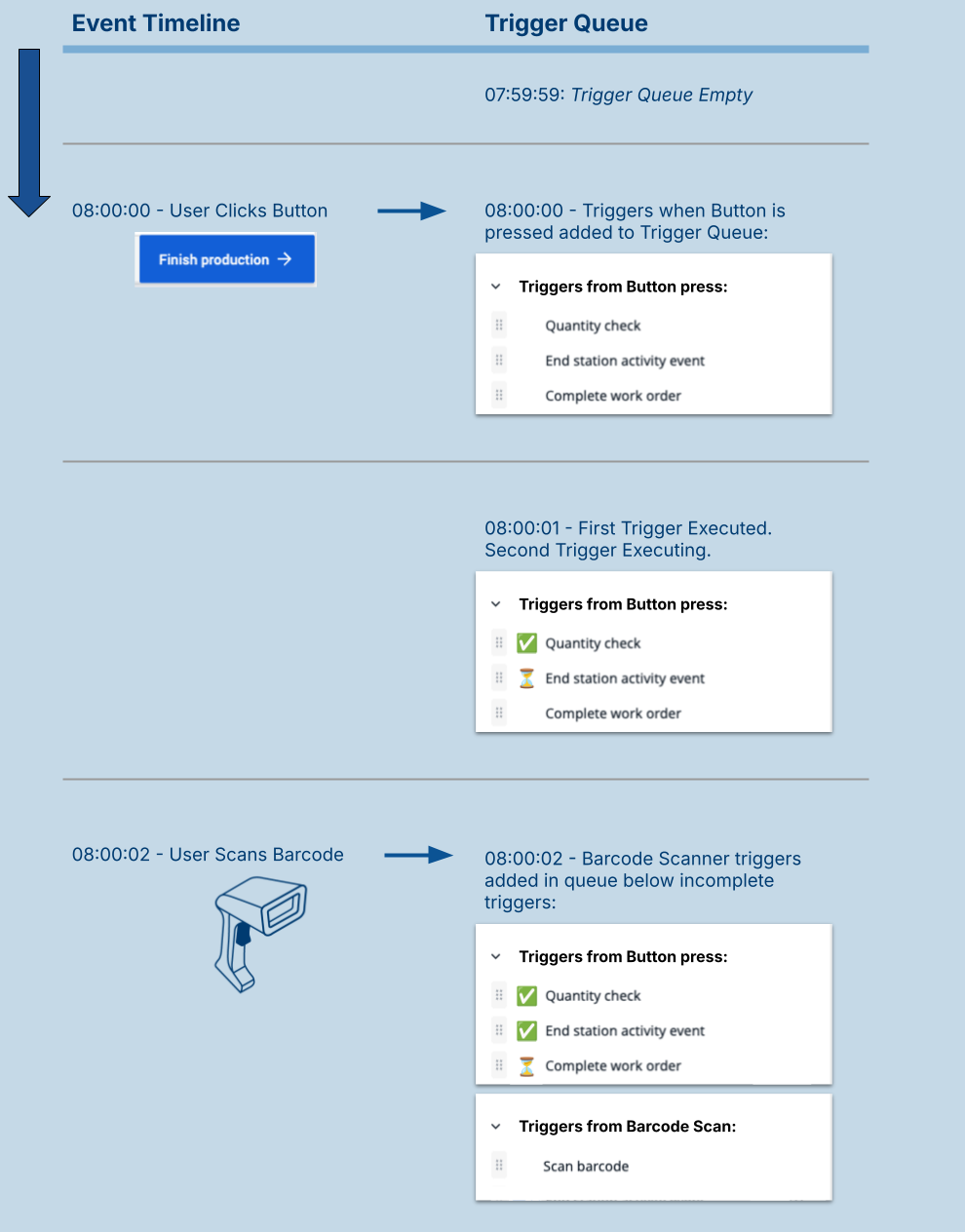
Two factors determine whether the queue operates efficiently:
- Queue entry rate: How frequently trigger events are added to the queue
- Queue exit rate: How quickly trigger logic completes execution
When triggers enter the queue faster than they exit, the queue builds up. Sustained trigger queue buildup causes app latency and, in some cases, dropped trigger events.
Think of trigger frequency like highway traffic. If too many cars enter the highway in a short time period, traffic slows down. To avoid buildup, cars must enter at a rate the highway can accommodate.
Combined frequency
The combined rate of all trigger events in an app determines overall queue entry rate. Each trigger event you configure adds to this combined rate.
See the table below for examples of combined frequency:
| Configuration | Combined frequency |
|---|---|
| 1 machine attribute updating every 1 second | 1Hz |
| 5 machine attributes updating every 1 second | 5Hz |
| 1 machine attribute (1 sec) + 1 timer (2 sec) | 1.5Hz |
Trigger logic speed scale
The type of trigger logic determines how quickly triggers exit the queue. Logic that requires Cloud communication, Transitions, or external system responses take significantly longer to run than local operations.
The table below describes the speed of different types of logic.
For high-frequency triggers, aim to use only logic rated Very fast or Fast.
| Speed | Logic type | Examples |
|---|---|---|
| Very fast | Local application logic | Reading or updating local data (e.g. variables) |
| Fast | Cached cloud data | Reading already-loaded table records |
| Medium | Tulip Cloud | Loading, updating, or creating table records; reading or updating machine state |
| Slow | Tulip Cloud | Table aggregations and queries |
| Very slow | External systems | Connector functions |
There is currently no easily accessible app performance log available for evaluating trigger performance. App performance can only be inferred through step times in completion records, which is useful in cases where steps involve extensive looping.
Technical factors that impact trigger performance
- Local hardware - Trigger logic executes on local hardware, and thus device specifications critically impact how quickly triggers complete and exit the queue. For device specifications, see Recommended Devices for Tulip Player.
- External dependencies - External dependencies include connectivity to the cloud, local network latency, and the response time of external systems like Enterprise Resource Planning (ERP).
- Devices connected via Tulip Edge devices - Tulip apps are dependent on cloud connectivity, which can introduce latency. For example, a torque controller connected to an edge device still communicates with Tulip Player through Tulip cloud services. To understand device connections, see these sequence diagrams for device connections via Tulip drivers.
- Latency issues with Connector Functions - Slow response from a system (e.g. an ERP) via a connector function can cause app delays, especially if the app loops through many records with each requiring a potential two-second API call. To understand system connections, see these sequence diagrams for connecting to enterprise systems.
- Latency between shop floor and Tulip cloud infrastructure - To minimize latency, your Tulip instance is located in the same geography as your shop floor.
Guidance
Avoid high-frequency triggers
You should avoid high-frequency triggers where possible and instead use other features, such as Automations.
You may also want to redesign your application architecture to operate at a lower rate. For example:
- Less frequent data reporting with queries and aggregations
- For asynchronous use cases, looping can be performed via Automations
- For synchronous use cases, looping that must be done sequentially should be done via Functions
If you must use a high-frequency trigger, you should configure the trigger to only execute local work (e.g., updating an app variable). Then, use a low frequency trigger to do the slower executions (e.g., updating a table record).
If you are using a high-frequency Timer trigger to rapidly react to context outside of a Tulip app, you may be able to use an “Event Stream” Tulip Machine with machine and device triggers.
Usage of Tulip Table APIs
Using Table APIs to read or write multiple times per second can impact your instance’s performance and cause delays in reading or storing data. The recommendations below apply to all scripts and trigger actions that run Tulip APIs on a Tulip instance:
Recommendation
- Plan your logic execution to abide by Tulip's Table rate limits
- Avoid frequent writes to the same Record in a Table (more than 1/sec)
When thresholds are exceeded, Tulip may rate limit and return error code 429. Scripts should be made resilient to 429 error codes to try again after a delay.
Machine, device, and timer triggers
Low-interval timer triggers (every 1-2 seconds) can overwhelm your apps, especially when timer triggers include multiple API calls (i.e. table writes or connector function runs).
Tulip no longer supports a timer trigger with <30sec frequency. For timer triggers used in an event-based architecture (i.e. a table record field changed or the current time is 7:00am), we recommend using Machines or [Automations]. Contact your Tulip representative if you have questions about this transition.
Machine triggers listen to attribute changes from connected equipment and execute logic in response. When machine attributes report at high-frequencies or when multiple attributes are monitored simultaneously, the trigger execution can exceed the rate at which the app processes the triggers. This can lead to performance degradation.
Recommendation
- Limit machine attribute subscriptions to only those that are necessary for the current step or workflow
- Separate high-frequency logic from cloud operations and use a lower-frequency trigger to handle cloud-dependent actions
Example scenario: A machine attribute updates 4 times per second, and you need to track the update count in a table record.
Trigger 1 (machine event): Update an app variable with incoming machine data
Trigger 2 (timer, every 10 seconds): Write accumulated data to a table record
| Approach | Configuration | Performance |
|---|---|---|
| Optimal | Machine trigger increments app variable; timer trigger writes to table every 10 seconds | Good (cloud operation at 0.1 Hz) |
| Slow | Machine trigger writes directly to table on each update | Poor (cloud operation at 4 Hz) |
- Consider using automations for asynchronous processing to remove the processing load from the trigger queue. For example, if machine data must be processed but does not require immediate operator feedback in the app session
- Use only fast operations in triggers, such as Read/update app variables or Read table records
- Evaluate your app architecture and consider redesigning it to operate at a lower rate if your use case requires monitoring many attributes at high frequencies. Alternative approaches include:
- Aggregate data at the machine or edge device level before sending it to Tulip
- Use Automations for data collection and processing
- Reduce the reporting frequency at the data source
- Consider using Tulip Player drivers rather than Edge device-hosted drivers
Did you find what you were looking for?
You can also head to community.tulip.co to post your question or see if others have solved a similar topic!
.gif)