
Overview of this article
- The scope of this article discusses a simple Tulip Table solution to implement a solution for User Certifications wherein depending on a User's Certification status, a User is or is not able to perform a function in a Tulip app.
- The context of this solution is an alternative to integration to a traditional Learning Management System (LMS), when an LMS is not implemented or integration to an LMS is not practical.
Solution Design
This simple solution consists of a single horizontally-scalable Tulip Table, optionally a 'CRUD app' enabling appropriate users to Create/Read/Update/Delete records in the table, and app triggers to check for certifications.
Tulip Table Design
Create a Tulip Table with the following columns, where each record represents the association between a user and a specific certification. This structure is both simple and scalable, with one record per user-certification pair. When a user is re-certified, only the 'Expiration Date/Time' field requires updating.

Columns
| Column | Data Type | Summary |
|---|---|---|
| ID | Text | Can be a RANDOMSTRING(). Just needs to be a unique value. |
| User | User | The user to which the certification applies. |
| Certification Name | Text | Name of the certification. |
| Expiration Date/Time | Datetime | Certification's expiration date and time. |
Query & Aggregations
Use dynamic queries to check certification status by passing the logged-in user and required certification name into the app.
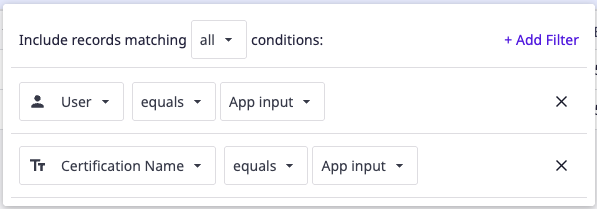
Query Limit: Set to 1, as there should only be one record per User <-> Certification Name, pair.
Aggregations
- Count aggregation - if the Count = 0, the User does not have the certification.
- Use a 'Mode' aggregation on the 'Expiration Date/Time'
- If the 'Expiration Date/Time' is >= the App Info - Current Date and Time, the User is allowed to perform the function as determined by the App's design.
Additional Solutions
For a more sophisticated solution, consider the 'Frontline Training and Skill Management' app suite:
Did you find what you were looking for?
You can also head to community.tulip.co to post your question or see if others have solved a similar topic!