

Una decisione comune nel monitoraggio delle macchine riguarda quando utilizzare le tabelle Tulip al posto della tabella delle attività della macchina.
In questo articolo imparerai:* Quando utilizzare le tabelle Tulip* Quando utilizzare la tabella delle attività della macchina* I punti di forza e i limiti di ciascuna
Tabella delle attività della macchina: monitoraggio OEE integrato
Una tabella di sistema che la macchina attiva automaticamente e che registra:
- Stato (In esecuzione, Arrestata, Offline)
- Ora di inizio, ora di fine e durata
- Motivo del tempo di inattività
- Numero di pezzi e numero di difetti
- Ritmo di produzione ideale
- Campi attività personalizzati (definiti dall'utente)
Punti di forza
- Configurazione minima - associato automaticamente alle macchine Tulip
- Ottimizzato per i calcoli OEE (disponibilità, prestazioni, qualità)
- Funziona perfettamente con i trigger delle macchine (headless)
- Gli strumenti di analisi possono interrogare direttamente i dati relativi all’attività delle macchine
Limiti
- Nessun accesso all’API delle tabelle Tulip: non è possibile leggere o scrivere in modo programmatico nella tabella “Machine Activity” tramite API
- Mancanza di ID record nella tabella: difficile collegarsi ad altre tabelle
- Esportazione solo tramite archivio CSV (non è prevista l’integrazione in tempo reale)
Utilizzare la tabella delle attività della macchina solo per l’OEE
Se il vostro unico obiettivo è monitorare i tempi di attività e di inattività della macchina e calcolare l’OEE, utilizzate i trigger della macchina con la tabella delle attività della macchina. Questa è la soluzione più semplice ed economica.
Esempio
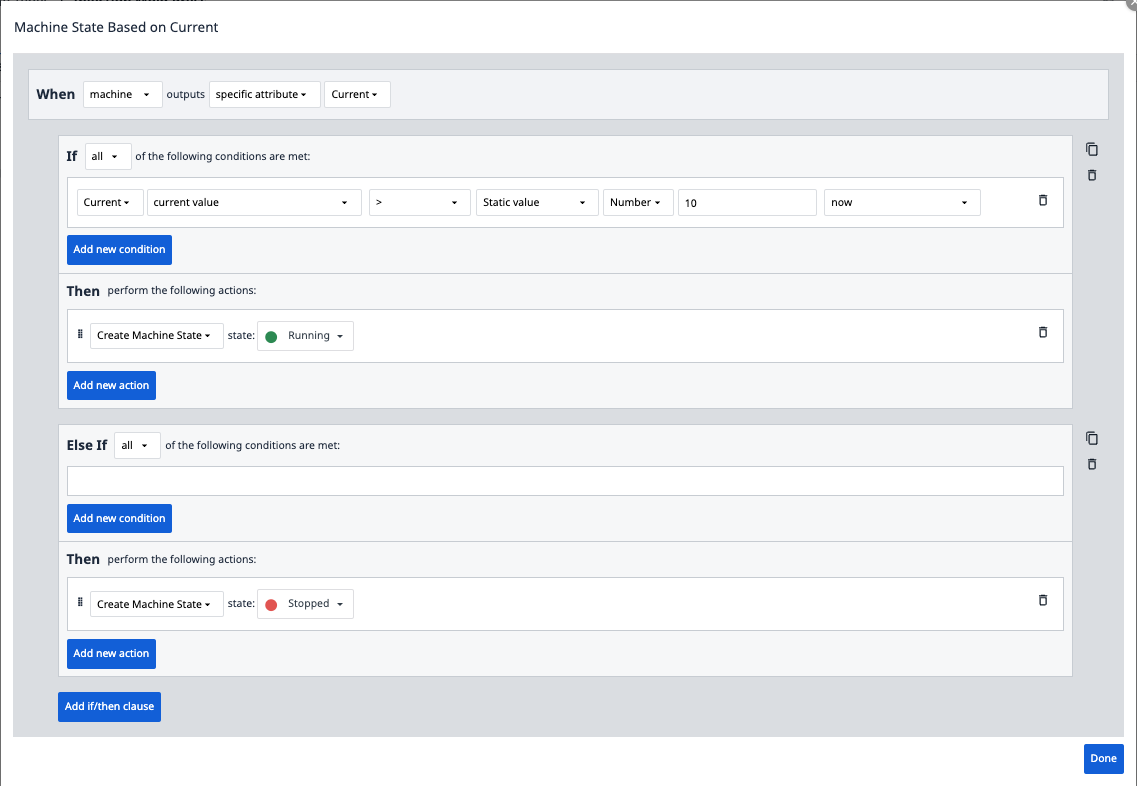
Tabelle Tulip: modello di dati flessibile per casi d’uso complessi
Quando utilizzare le tabelle Tulip
- Hai bisogno di campi dati personalizzati non disponibili nella tabella delle attività della macchina (ad esempio, ID ordine di lavoro, badge operatore, SKU)
- Hai bisogno di operazioni CRUD (Crea, Leggi, Aggiorna, Elimina) tramite API
- Si integrano i dati delle macchine con altri processi aziendali (qualità, inventario, manutenzione)
- Si desidera contestualizzare i dati delle macchine con ordini di lavoro, lotti o programmi di produzione
Utilizza sia la tabella delle attività della macchina che le tabelle Tulip
Tabella delle attività delle macchine (tramite trigger delle macchine):
- Acquisisci le variazioni di stato grezze
- Calcola le metriche OEE
Tabella Tulip (tramite automazioni o trigger delle app):
- Arricchire i dati delle macchine con il contesto aziendale
- Abilitare integrazioni basate su API
- Collegamento a ordini di lavoro, registrazioni di qualità e altri dati
Esempio di architettura
Nota: per "automazione" si intende Tulip Automations.
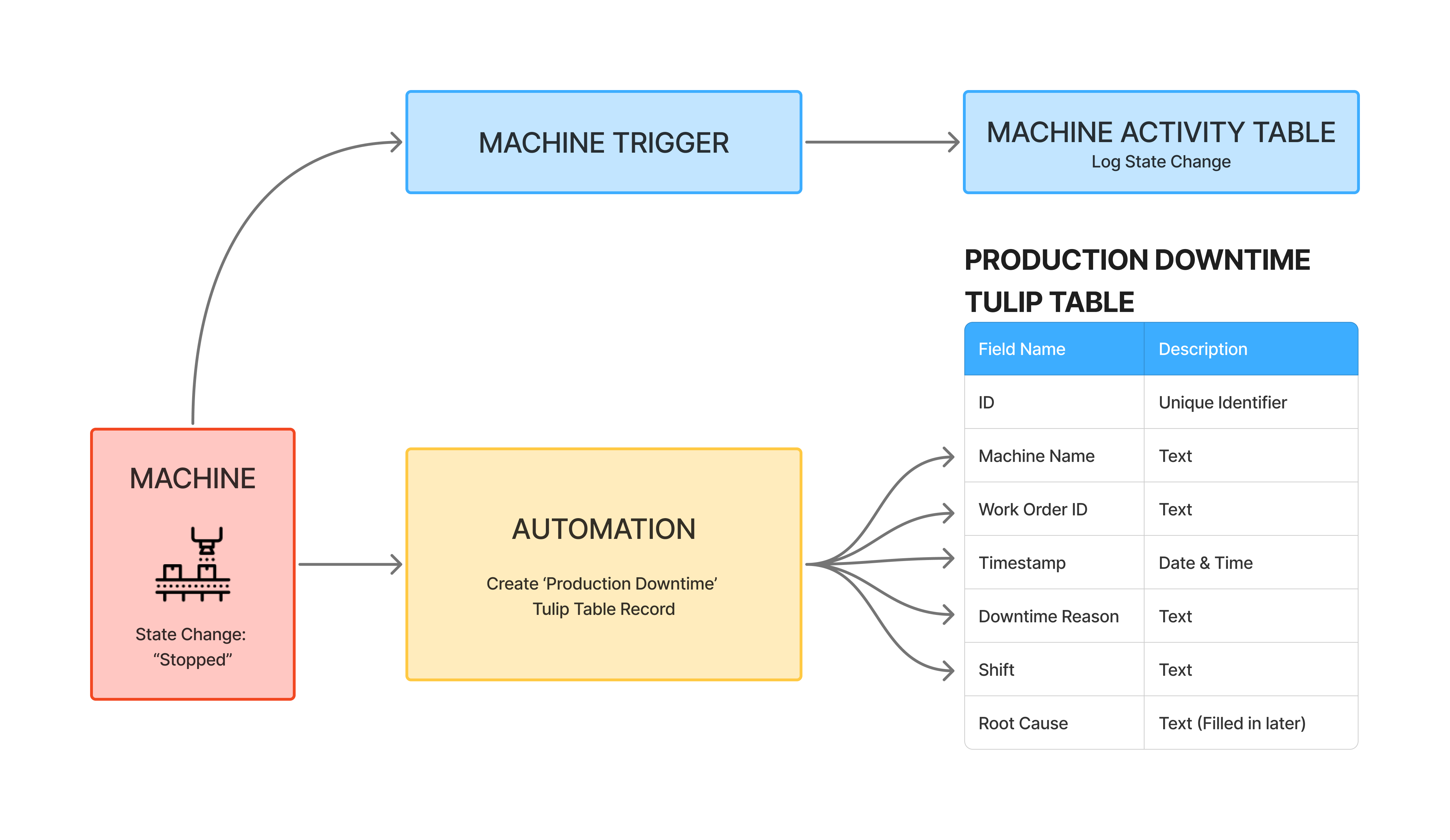
Questo modello ibrido offre:
- Dashboard OEE dalla tabella delle attività delle macchine
- Analisi delle cause alla radice dalla tabella Tulip con accesso API per strumenti di BI esterni
Gestione dei dati manuali con modelli di rilavorazione e scarti
Sfida: le macchine segnalano automaticamente il conteggio dei pezzi, ma il contesto umano (rilavorazioni, scarti, regolazioni manuali) richiede un inserimento manuale. Come si conciliano i conteggi automatici delle macchine con le correzioni manuali?
Evitare di alterare i dati delle macchine
Non tentare di decrementare il conteggio dei pezzi della macchina quando un operatore registra una rilavorazione.
Perché questo approccio non funziona: la macchina non comprende il contesto umano. Se si riscrivono i dati nella macchina, si corrompono i dati grezzi alla fonte.
Separare le fonti di verità
- Lascia che la macchina riporti i conteggi grezzi.
- Utilizzare una tabella separata per le rettifiche manuali.
- Calcolare la produzione netta tramite espressioni.
Esempio di modello di dati
Tabella delle attività della macchina (automatica):
- Conteggio pezzi: 104 (dati grezzi forniti dalla macchina)
- Difetti: 0 (la macchina non li registra)
Tabella del registro di produzione (tabella Tulip, tramite app):
- ID: 12345
- Ordine di lavoro: WO-5678
- ID macchina: CNC-001
- Pezzi lordi: 104 (copiati dalla macchina al termine della lavorazione)
- Numero di rilavorazioni: 4 (inserito dall'operatore)
- Numero di scarti: 0
- Pezzi netti: 100 (calcolati: Totale - Rilavorazioni - Scarti)
- Data e ora
Flusso di lavoro dell'app:
- L'operatore avvia un ciclo e seleziona un ordine di lavoro
- La macchina funziona e incrementa automaticamente il conteggio dei pezzi
- L'operatore nota che 4 pezzi necessitano di rilavorazione e li rimanda in lavorazione
- La macchina arriva a 104 (la macchina conta 104 pezzi)
- L'operatore termina il ciclo e l'app crea un record nel Registro di produzione
- L’app copia il conteggio dei pezzi della macchina (104) nel campo “Pezzi lordi”
- L’operatore inserisce manualmente il «Numero di pezzi da rilavorare»: 4
- L'app calcola i pezzi netti = 104 - 4 = 100
Analisi:
- OEE della macchina: utilizza il numero di pezzi grezzi (104) per il calcolo delle prestazioni
- Report di produzione: utilizza il numero netto di pezzi (100) per la produzione effettiva
Miglioramento opzionale: registrare i difetti in un campo "Attività della macchina" per il calcolo della qualità OEE:
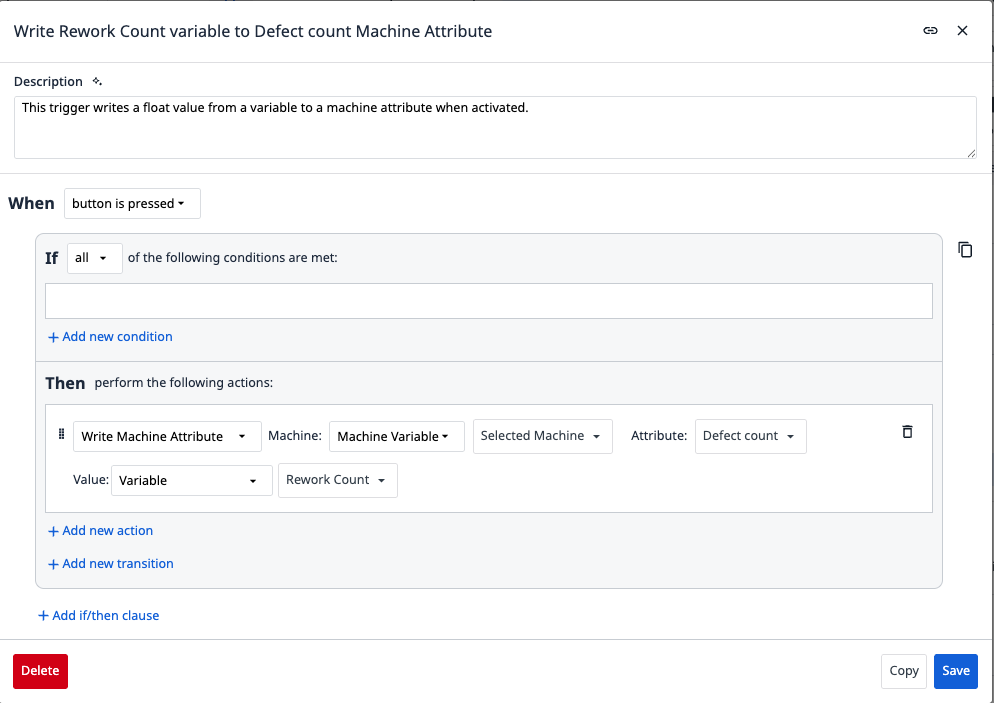
Ciò consente alla percentuale di qualità dell’OEE di riflettere il tasso di difetti effettivo, pur mantenendo i conteggi grezzi della macchina.
Approfondimenti
{{snippet.Hai trovato quello che cercavi?}}