

Tulip offre flessibilità nel modo in cui strutturare le app attorno alle macchine. Il modello più adatto dipende dalla maturità tecnica del vostro team, dalla standardizzazione dei processi e dal budget.
Modello 1: App composabili per macchine (modello 1:1)
Struttura: Una macchina → Un’app → Una stazione → Un terminale
Diagramma dell’architettura:.png)
Casi d’uso
- Sviluppatori non professionisti alle prime armi che realizzano le loro prime app di monitoraggio delle macchine
- Implementazionirapide di proof-of-concept in cui la semplicità prevale sull’efficienza
- Processi personalizzati gestiti manualmente per ogni istanza di macchina (ad es., la Macchina 1 richiede fasi di ispezione specifiche non applicabili alla Macchina 2)
- Sviluppo guidato dalle operazioni, in cui gli sviluppatori ricoprono più ruoli e dispongono di tempo limitato
Perché è importante
Questo modello mappa fisicamente il software all’hardware in rapporto 1:1, eliminando l’astrazione. Gli sviluppatori possono identificare una macchina in officina e mapparla alla propria app. Questa chiarezza riduce lo sforzo mentale e rende intuitiva la risoluzione dei problemi.
Esempio
Scenario: un produttore di alimenti e bevande dispone di 3 linee di confezionamento. Ogni linea presenta motivi di fermo macchina, configurazioni dei componenti e flussi di lavoro degli operatori specifici.
Implementazione
- Creare il tipo di macchina: "Linea di confezionamento"
- Creare 3 macchine: "Linea A", "Linea B", "Linea C"
- Creare 3 app: "Terminale Linea A", "Terminale Linea B", "Terminale Linea C"
- Assegnare ciascuna app a una postazione dedicata con un terminale fisso
Vantaggi
- Il chiaro isolamento dei dati impedisce la corruzione dei dati tra le macchine
- Facile personalizzazione dei flussi di lavoro per ogni macchina
- Semplice risoluzione dei problemi (il problema si trova sempre in un'unica app autonoma)
Limiti
- Richiede un terminale fisico per ogni macchina (costo dell’hardware)
- Le modifiche globali all’app richiedono l’aggiornamento di 3 app separate
- Non scalabile oltre circa 10 macchine
Modello 2: Assegnazione delle macchine all’app della postazione
Struttura: un tipo di macchina → un’app → più stazioni (macchina assegnata dinamicamente tramite mappatura delle stazioni)
Diagramma dell’architettura: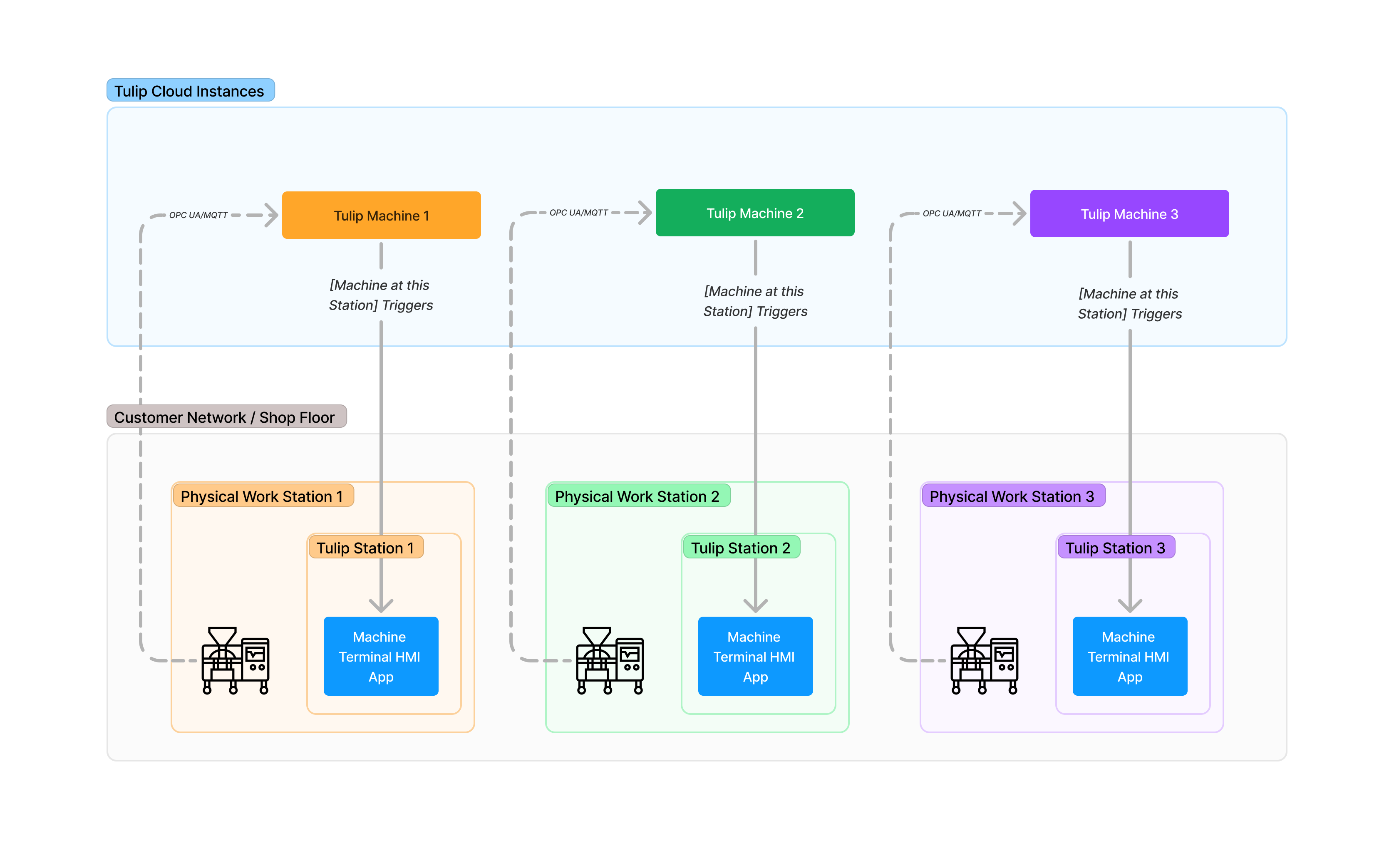
Casi d’uso
- Processi standardizzati su tipi di macchina identici
- Sviluppatori "citizen" a tempo pieno a proprio agio con l’astrazione e la logica di attivazione
- Necessitàdi scalabilità orizzontale (10 o più macchine dello stesso tipo)
- La manutenzione centralizzata delle app è una priorità
Come funziona
- Assegnare ogni macchina a una postazione in "Shop Floor" > "Macchine " (scheda "Configurazione")
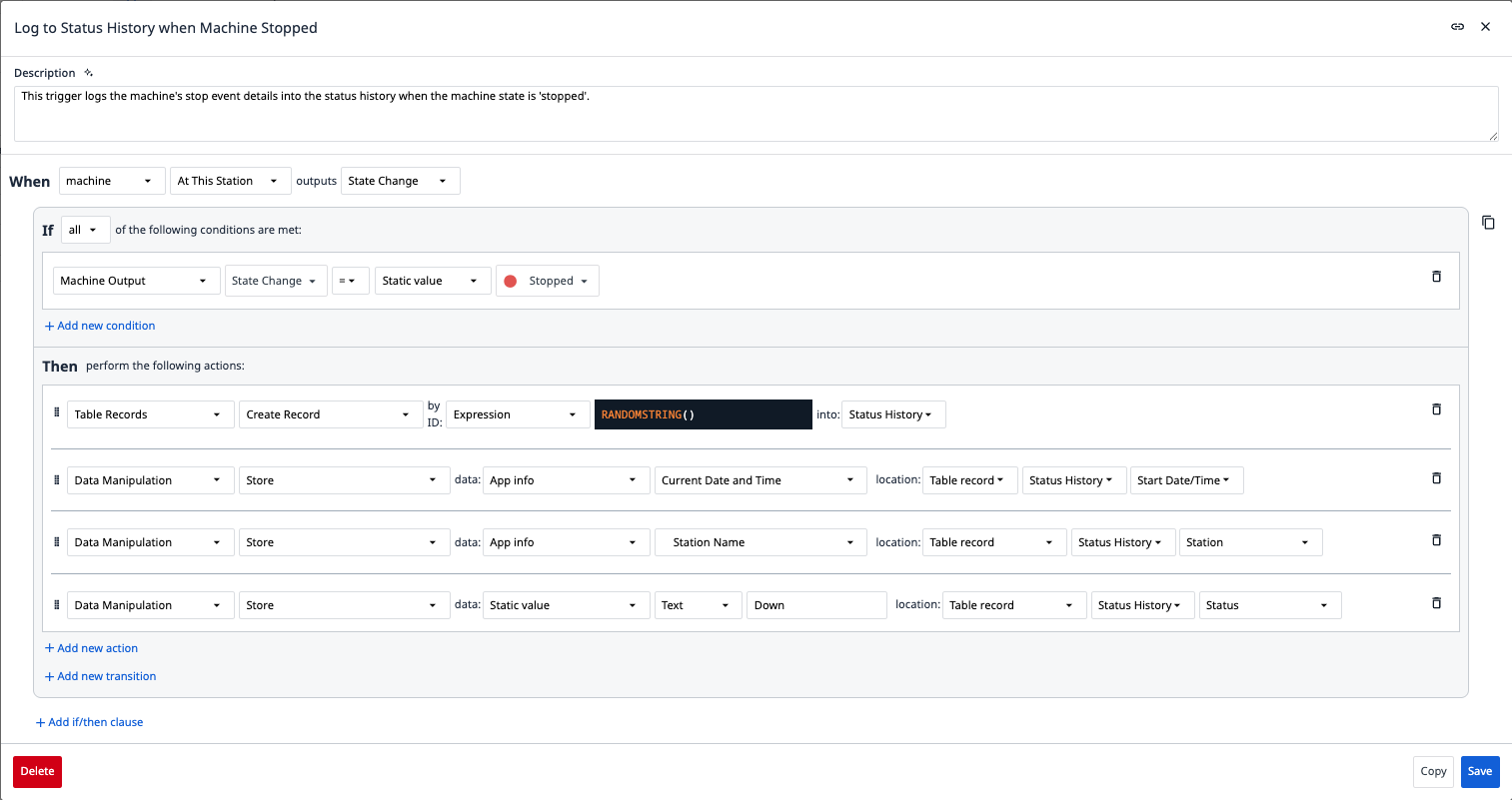
- Nell’app, utilizzare le condizioni di trigger “in questa stazione” per fare riferimento in modo dinamico alla macchina assegnata
- Quando l’app viene eseguita sulla Stazione 1, interagisce con la Macchina 1. Quando viene eseguita sulla Stazione 2, interagisce con la Macchina 2
Esempio di trigger dell’app
Quando: la macchina in questa postazione generaun "Cambio di stato"Se: Uscita della macchina / Cambio di stato =Spenta Allora: Crea un record nella tabella "Cronologia stato".
Esempio
: un fornitore di primo livello del settore automobilistico dispone di 15 fresatrici CNC identiche che eseguono lo stesso processo di produzione.
Implementazione
- Creare il tipo di macchina: "Fresatrice CNC a 5 assi"
- Creare 15 macchine (da CNC-001 a CNC-015)
- Creare un'app: "Terminale operatore CNC"
- Creare 15 postazioni, assegnando una macchina a ciascuna
- Distribuire l’unica app a tutte e 15 le stazioni
Vantaggi
- Un'unica app da gestire (gli aggiornamenti globali si propagano istantaneamente)
- Tempi di sviluppo delle app ridotti per le implementazioni su flotta
- Utilizza la logica di attivazione "in questa postazione" (riferimento dinamico integrato al computer)
Limiti
- Richiede ancora un terminale per ogni stazione (il costo dell’hardware rimane)
- Tutte le macchine devono essere dello stesso tipo con attributi identici
- La logica personalizzata per macchina richiede ramificazioni condizionali (maggiore complessità)
Modello 3: App con variabili macchina (terminale flottante)
Struttura: Un'unica app → Diversi tipi di macchine → Selezione delle macchine in base a variabili → Terminale condiviso/flottante
Diagramma dell’architettura: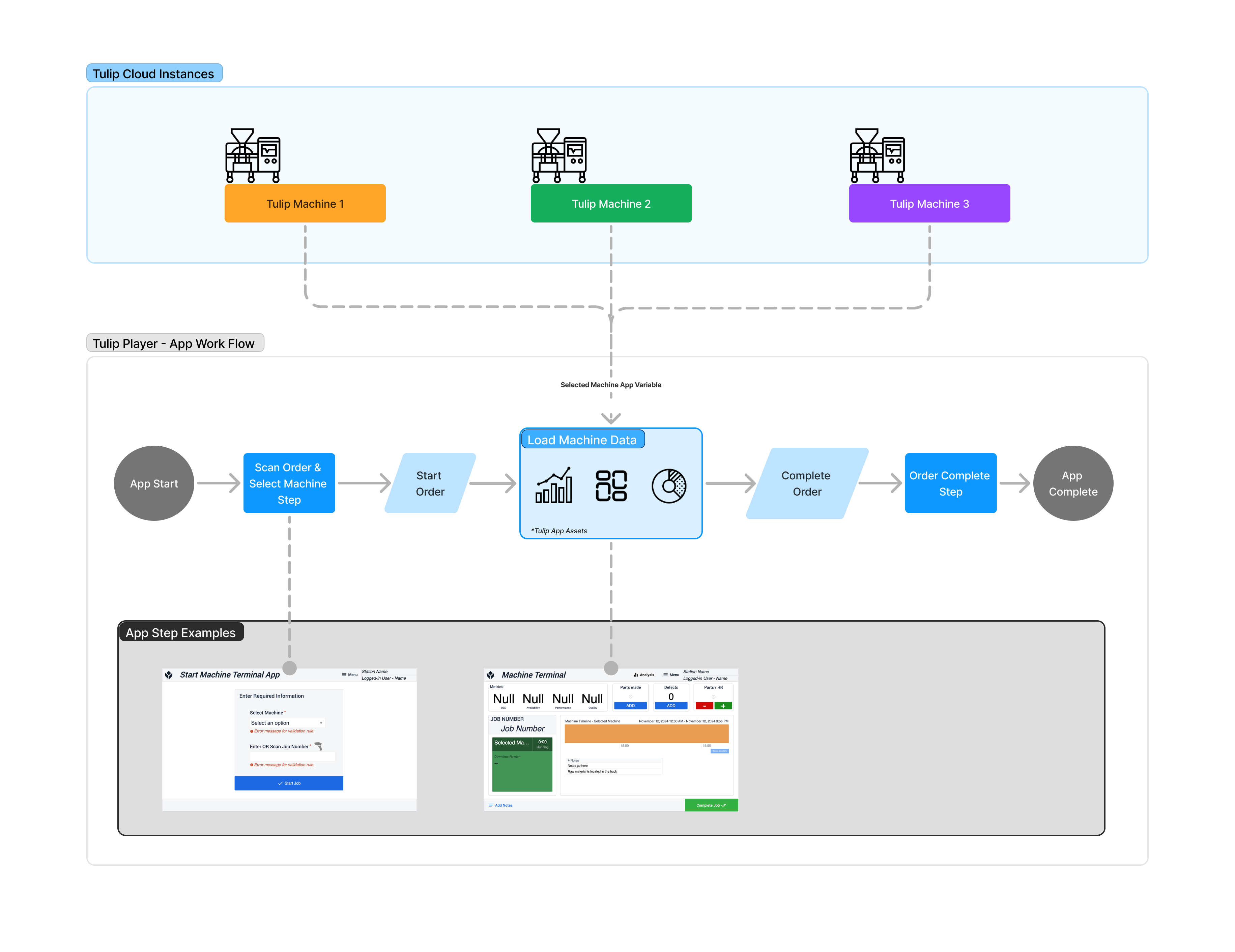
Casi d’uso
- Vincoli di budget: numero limitato di terminali disponibili
- Modello operatore fluttuante: un operatore si sposta tra le macchine con un iPad condiviso
- Le macchine non richiedono un monitoraggio continuo: l’app deve essere in esecuzione solo durante le operazioni attive
Limitazione critica: non supporta il funzionamento in modalità headless
Questo modello non supporta il monitoraggio in background o senza interfaccia utente. Se l'app è chiusa, nessuna macchina attiva un allarme. Questo modello è adatto solo per:
- Inserimento dati avviato dall’operatore (l’operatore registra difetti, conta i pezzi)
- Ispezioni ad hoc delle macchine
- Scenari in cui le macchine non generano dati quando l’app non è in esecuzione
Come funziona
- Creare una variabile macchina nell’app (ad es.,
selectedMachine) - Aggiungi un widget a tendina o la scansione di un codice QR per popolare
selectedMachinein fase di esecuzione - Utilizza
selectedMachinein tutti i riferimenti ai trigger
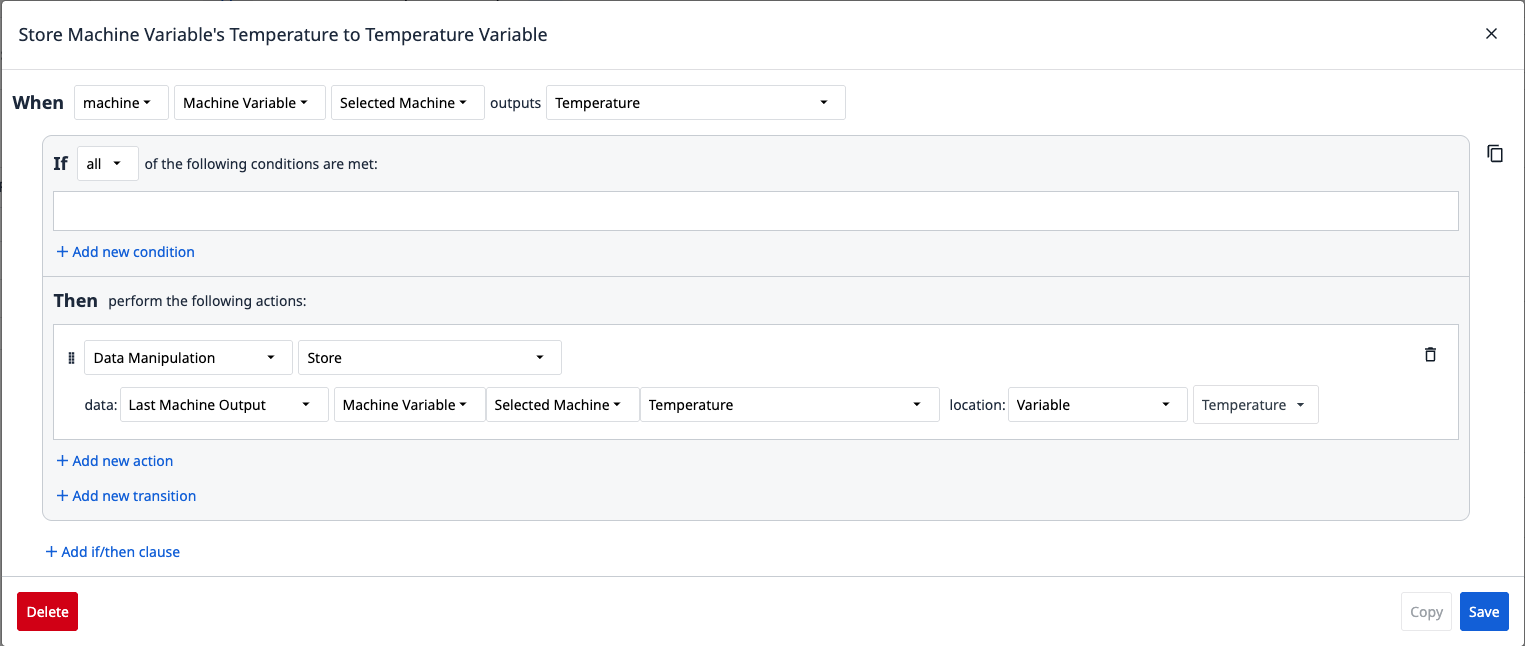
Esempio di trigger dell’app
Quando: la variabile di macchina "Selected Machine" restituisce {Attribute}Allora: memorizza l'ultimo valore restituito da "Selected Machine" nella variabile
Esempio
: un laboratorio farmaceutico dispone di 5 strumenti analitici che funzionano solo durante i test programmati. I tecnici utilizzano un iPad condiviso per registrare i parametri e i risultati dei test.
Implementazione
- Creare 5 macchine (HPLC-1, GC-MS-2, ecc.)
- Creare un'app: "Registro delle apparecchiature di laboratorio"
- Aggiungere un menu a tendina: "Seleziona strumento" → popola la variabile
selectedMachine - Il tecnico porta l’iPad da uno strumento all’altro, seleziona la macchina attiva e registra i dati
Vantaggi
- Costo hardware minimo (un unico terminale condiviso)
- Selezione flessibile della macchina durante l’esecuzione
- Ideale per flussi di lavoro ad hoc/intermittenti
Limiti
- Non è "headless ": l'app deve essere attivamente in esecuzione affinché qualsiasi logica venga eseguita
- Nessun monitoraggio in background quando l’app è chiusa
- Gestione complessa dello stato (quale macchina è attualmente attiva?)
- Non adatto al monitoraggio dell'OEE 24 ore su 24, 7 giorni su 7
Albero decisionale dei modelli architetturali
Utilizza questo albero decisionale per selezionare il modello più adatto alle tue esigenze:
Approfondimenti
{{snippet.Hai trovato quello che cercavi?}}