

Machine monitoring connects shop floor equipment to Tulip to track real-time machine data, calculate OEE, and build human-machine workflows. As you scale from monitoring a single machine to managing a fleet, choosing the right architecture pattern is critical for maintainability, cost-efficiency, and performance.
This guide synthesizes best practices from Tulip solution architects and customer implementations to help you design scalable, production-ready machine monitoring solutions.
In this article, you will learn:
- Key concepts of machine monitoring components
- Decision tree for selecting the right machine monitoring architecture
This article is primarily intended for solution architects, IT/OT engineers, experienced citizen developers, and technical decision-makers evaluating machine monitoring implementations.
Machine monitoring components
To understand architecture patterns, you need to know the core components of Tulip's machine monitoring system:
Machine: A digital representation of a physical asset. Machines have attributes (e.g., spindle speed, temperature) that you update via OPC UA, MQTT, or the Tulip machine attributes API.
Machine Type: A template that defines states, attributes, and triggers for a category of similar machines (e.g., "CNC Mill" type for 5 different make/models).
Machine Attribute: A data point from a machine (e.g., "Cycle Time", "Part Count"). Attributes can be read-only (sensor data) or writable (setpoints).
Machine Trigger: Conditional logic that runs headless (without an app running) to update machine state or activity fields based on attribute changes.
Machine Activity Table: A system table that logs machine state history, part counts, defects, and downtime reasons for OEE calculation. Important: This table has no Tulip Table APIs enabling real-time reads & writes.
Station: A physical or logical location on the shop floor. You can assign machines to stations to enable "at this station" trigger logic.
Typical enterprise-level machine connectivity architecture
The architecture below is the most common for enterprise-level large-scale connectivity.
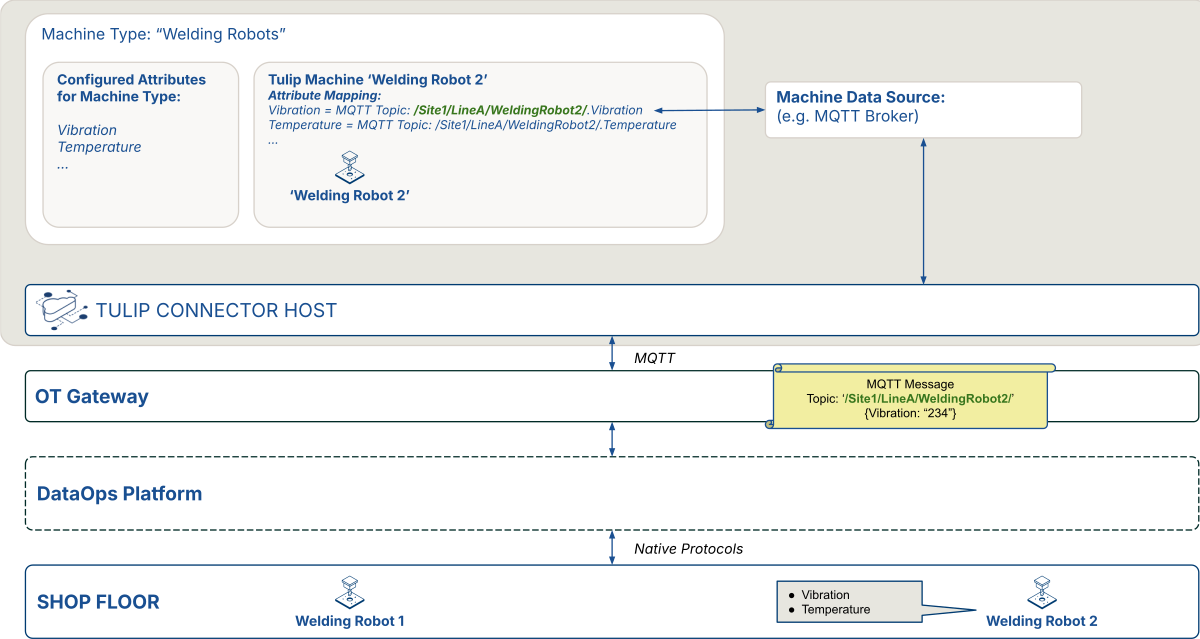
This shows how a shop floor machine would be connected to Tulip via an OT gateway with an MQTT broker, and optionally a DataOps platform.
Select the right architecture
.png)
For more information, see:
Related resources
Use the links below to find relevant resources for your machine monitoring solutions.
Knowledge Base
- Machine Monitoring - Foundational concepts and setup guide
- How to Add and Configure Machines - Step-by-step machine configuration
- Machine Monitoring Architecture - Network topology and IT infrastructure
- Build Your First MQTT Data Source - Connector setup guide
- Using Machine Data in Analytics - Create OEE dashboards
- Automations - Automation capabilities
Tulip Library
- Machine Monitoring Dashboard App - Pre-built dashboard template
- Machine Monitoring Terminal App - Operator terminal with OEE tracking
- Composable MES: Production Management Suite - End-to-end production apps
Tulip University
API documentation
- Use the machine attributes API - Write machine attribute values
- Table API guide - Read and write Tulip Tables
Did you find what you were looking for?
You can also head to community.tulip.co to post your question or see if others have solved a similar topic!