
Release 393 contains updates to several features and bug fixes throughout the platform.
Let us know your thoughts and questions in the Tulip Community thread.
Features and Improvements
Agent chat
- In AI agent chat, the "Thinking" and "Reasoning" section no longer appears because agents already explain what they're doing in the response. Agents still reason the same way before responding.
Automations
- In Automation Run History, a run that hits a limit now names the specific limit, instead of reporting several different limits as "Limited by rate". Additionally, runs stopped by a limit now show a red Error badge instead of a yellow Limited badge.
Automations Editor
- The Automation Editor now detects when a user is saving changes based on an out-of-date version of an automation. Instead of quietly overwriting the newer version, the editor now shows a conflict error with two choices: "Discard local changes" to take the latest saved version, or "Overwrite" to replace the previous version with your local changes.
Connector
- An LTS instance now accepts On-Prem Connector Hosts up to two LTS versions behind (for example LTS15 on an LTS17 instance), with an upgrade warning, so instance upgrades no longer require upgrading every OPCH at the same time.
Connector Function
- In the Connector Function Editor, saving a connector function now keeps the function open with its test input values, instead of returning to the connector page. This was requested from our Community members here!
Functions
- In the Function Editor, the toolbar now shows a save status icon, so you can see at a glance whether a function has unsaved changes.
Interfaces Page
- The Share Registration Link dialog now warns that a registration link should only be shared with trusted parties, and indicates whether the link expires after its first use. The "email this link" button, which previously did not work in Chrome, now opens the mail client.
Triggers
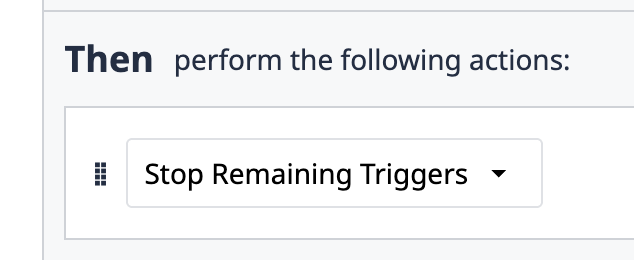
- In the trigger editor, added a new trigger action, "Stop remaining triggers", that ends the rest of an event's triggers without changing the step. Any actions after it in the same trigger are ignored.
Bug Fixes
Release 393 contains the following bug fixes:
| Referenced Ticket | Description |
|---|---|
| PLAT-59955 | Fixed an issue where the Assign to Workspace dialog for a connector could time out when the connector was used by many app triggers. The dialog now loads reliably. |
| PLAT-59922 | Fixed a UI issue where the "Scale (Brecknell PS25)" device trigger name was misspelled. |
| PLAT-59826 | Fixed an issue where connector functions that return a file or an image could fail to upload on Azure-hosted instances and report: "Connector function output extraction failed". These functions now upload successfully. |
| PLAT-59815 | Fixed an issue where Connector Hosts grew in memory while OPC UA machine data sources connected or reconnected. |
| PLAT-59800 | Fixed an issue where opening a trigger in the App Editor loaded all of the app’s data up front for the AI “Generate description” feature, even if it was never used, causing a delay when opening triggers on large apps. App data is now loaded only when you click “Generate description”. |
| PLAT-59776 | Backend improvement to the validation of SSO login redirects. |
| PLAT-59732 | Fixed a bug where renaming a published automation from the preview pane could overwrite its development draft with the latest published version. |
| PLAT-59716 | In the expression editor, fixed an issue where passing a list of objects to ARRAY_INDEX_OF or ARRAYCONTAINS with a non-object value showed an unexpected error message. The editor now shows a type-mismatch message. |
| PLAT-59489 | Fixed an issue where the rate limit on the public methods used to register an Interface from a registration link was never enforced. These methods are now rate-limited per connection, as originally intended. |
| PLAT-59228 | Fixed an issue where pressing undo or redo while typing in a text field in the Function Editor also undid or redid changes on the canvas. Users can now undo and redo text edits without affecting the canvas. |
| PLAT-59156 | Fixed an issue where, after a network interruption, an on-prem connector host could keep running test connections but time out on every connector function call until it was restarted. |
| PLAT-59084 | Fixed an issue in the Function and Automation editors where a table field could show another table’s custom label when two tables used the same field ID. Table record outputs, trace results, and logic blocks now show the correct label. |
| PLAT-59069 | In the Connector Function Editor, fixed an issue where changing an input's type kept the old test value, which could crash the editor (e.g., changing a Text input with a test value to Datetime). The test value is now converted to the new type when possible or otherwise cleared. Additionally, a date picked in an input's encoding settings now correctly appears as its Datetime test value. |
| PLAT-58225 | For Oracle SQL connectors, fixed a bug where the SSL setting was ignored and connections were not encrypted. Now, connections use TLS when SSL is enabled. |
| PLAT-57769 | In the Automation Editor, fixed an issue where two users editing the same automation at the same time could overwrite each other's changes without warning. Now, the editor pauses saving and flags the conflict. |
| PLAT-57734 | In the Player, fixed an issue where table widgets kept requesting table records after the session was refreshed, which could gradually slow down apps that use tables. |
| PLAT-57053 | Fixed an issue where changing a trigger's settings, such as enabling or disabling it, could delete the translated text in its Show Message and Show Error actions. Deleted text can't be recovered and needs to be re-entered in the trigger editor. |
| PLAT-48931 | In Tables, fixed an issue where values typed into a Table Query's test inputs could be cleared while typing, especially when the table was receiving live updates. |
| PLAT-39081 | On the Vision Camera Configuration page, fixed a UI issue where the gray text in the camera telemetry tooltip was hard to read. The text now renders white against the tooltip background. |
Full List of Ticket IDs included in Release 393
PLAT-59955
PLAT-59922
PLAT-59826
PLAT-59815
PLAT-59800
PLAT-59776
PLAT-59732
PLAT-59726
PLAT-59716
PLAT-59489
PLAT-59408
PLAT-59291
PLAT-59228
PLAT-59156
PLAT-59084
PLAT-59069
PLAT-58511
PLAT-58225
PLAT-57769
PLAT-57765
PLAT-57734
PLAT-57053
PLAT-55433
PLAT-50827
PLAT-48931
PLAT-48743
PLAT-39081