
Release 362 brings updates to several features and bug fixes throughout the platform.
Let us know your thoughts and questions in the Tulip Community.
Features and Improvements
Connector Function
-
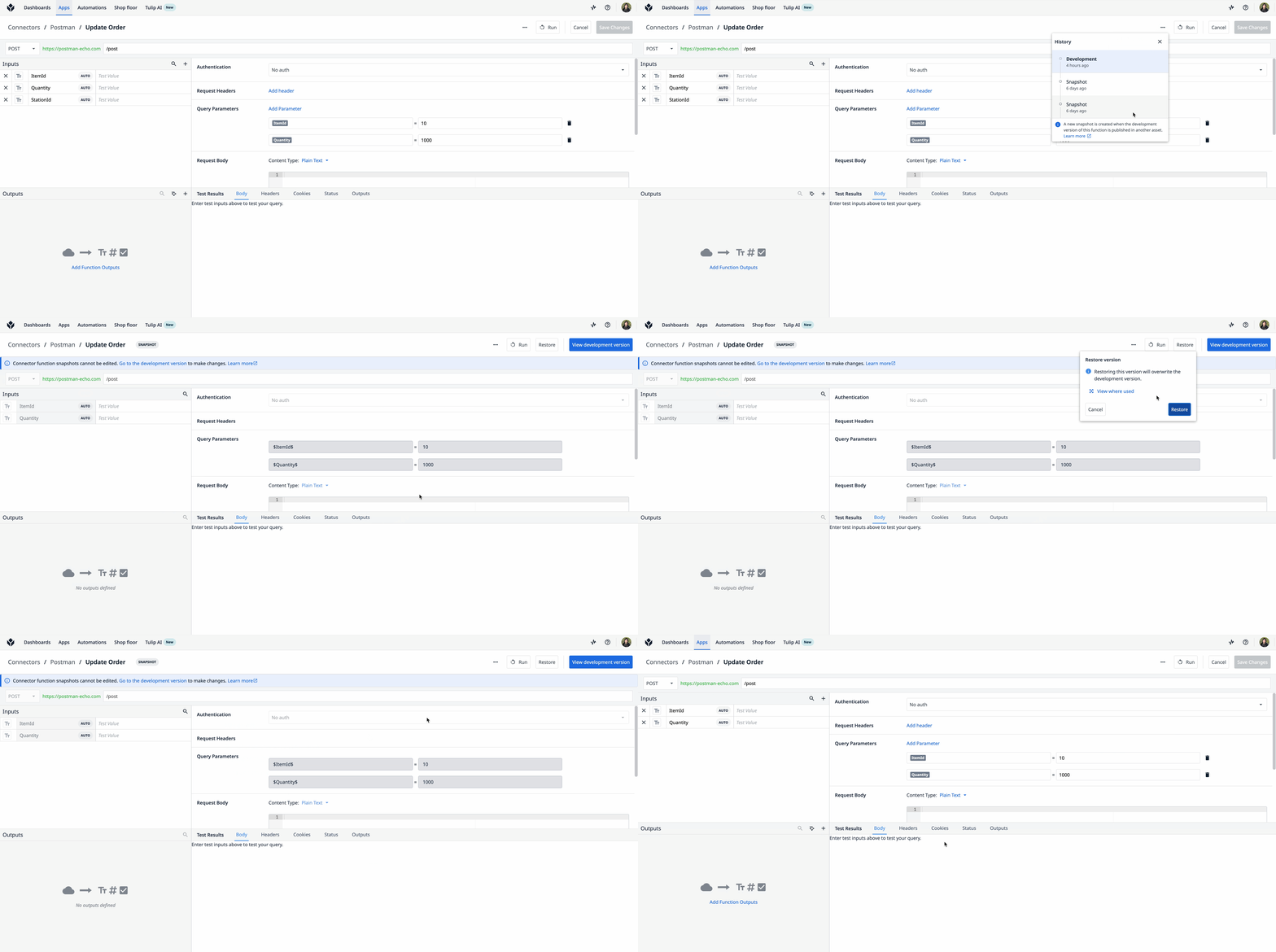
In instances with Connector Versioning enabled, you can now restore a previous connector function snapshot as the active development version and also review older snapshot configurations, then track where they are used across the platform. To access this, open the Connector Function Editor for the relevant function, click the three-dot menu, and select "View History". The Version History panel will list all previous snapshots for that function. Click any entry to view its configuration. For more details, see Connector Versioning.
-
In instances with Connector Versioning enabled, users can now edit a development-level connector function even if it is used in an app or an automation. Navigate to the Connector Function Editor, edit the inputs and outputs as desired, and click "Save". Upon clicking "Save", you will see a modal that shows all the apps/automations that would be impacted by this change. Within the App Editor, you can use the Error modal or the View Resources modal to see where your connector function is used. See Connector Versioning for more information.
Copilot
- Agent chat now supports .json and .md file attachments. This update allows users to share structured data and markdown content directly in the conversation.
- When an agent responds with CSV-formatted data, users can now download the data directly as a .csv file.
Bug Fixes
Release 362 contains multiple bug fixes:
| Referenced Ticket | Description |
|---|---|
| PLAT-52086 | Fixed an issue where, when approving a tool action in agent chat, users were receiving an error message ("The AI provider rejected the request") even though the action had completed successfully. Now, tool approvals complete without errors, and the conversation continues as expected. |
| PLAT-51910 | Fixed a bug for SQL connector functions where the “Returns Multiple Rows” checkbox would always be shown as unchecked, regardless of saved state. |
| PLAT-51441 | Fixed an issue that resulted in failed writes to new tables with audit log enabled. This occurred in rare cases when tracking record history for a new Tulip table and two records were attempted to be written within milliseconds. |
Full List of Ticket IDs included in Release 362
PLAT-52086
PLAT-51910
PLAT-51444
PLAT-51441
PLAT-49327
PLAT-47909
PLAT-37798