
Release 356 brings updates to several features and bug fixes throughout the platform.
Let us know your thoughts and questions in the Tulip Community.
Features and Improvements
Connector Function
- On the App Overview page under Versions tab, you can now see where Connector Functions are used. Click on a connector function name in the Resource Modal to view a full list of triggers where that function is used. If you click on a specific trigger name, you will be navigated directly to that trigger in a separate tab for quick editing. View which triggers in an app use specific connector functions or functions via an improved "View resources used" modal. Read more here.
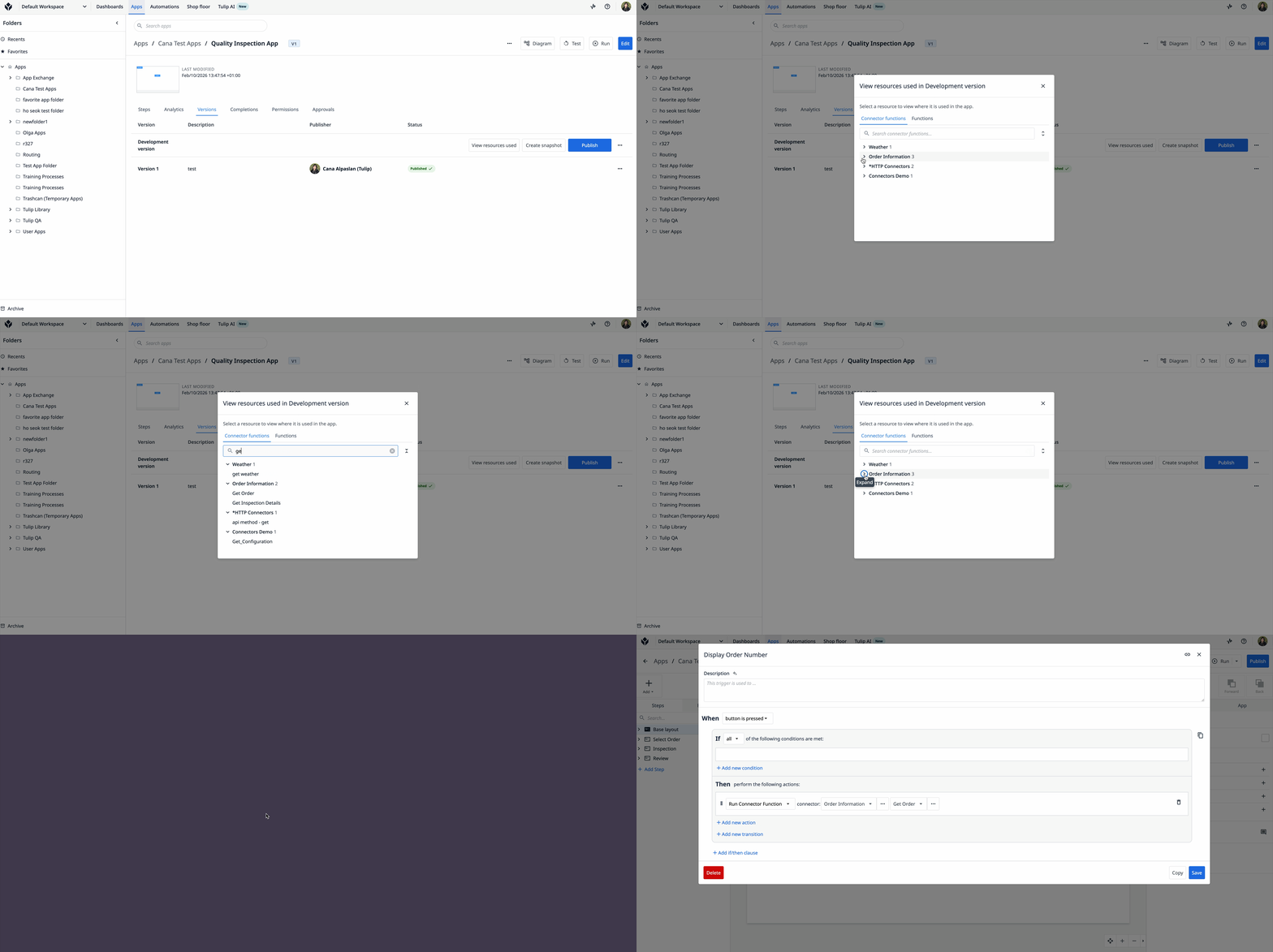
App Overview Page
- On the Steps tab of the App Overview page, removed the columns displaying the target cycle time and the step comments. This info is still available in the App Editor side pane on the Step tab.
Account Settings
- On the App Permissions page in Settings, fixed the click zone targeting to help prevent accidental changes to the settings. This is a continued UX fix that builds on a recent partial improvement shipped in r343.
Bug Fixes
Release 356 contains multiple bug fixes:
| Referenced Ticket | Description |
|---|---|
| PLAT-51114 | Fixed a bug where after changing the name of an MQTT connector function, no further saving changes would be possible. |
| PLAT-51074 | Fixed a bug where triggers could fail with "Connector function version is not loaded" or "Function version is not loaded" error in case of complex trigger logic. |
| PLAT-50885 | Fixed a bug where OAuth for connectors failed for iOS/Player in a rare edge case. |
| PLAT-50881 | Fixed a bug on the Connectors page where users received an error when attempting to navigate to the connector functions associated with snapshot connectors. |
| PLAT-50872 | Fixed an issue on the Connectors page where connectors could be saved without a name (an empty field) when using the quick edit modal. |
| PLAT-50855 | Fixed a bug on the Connectors page where offline MQTT and OPC UA connectors incorrectly appeared as online. This bug was due to the online status badge, not the connectors. |
| PLAT-50851 | Fixed a bug on the desktop and the in-browser Player that prevented camera switching between the front and rear cameras in the Barcode Scanner widget. |
| PLAT-50821 | Fixed a bug on the Connectors page that cause the page to crash when a user navigated rapidly between different types of connectors (ex. HTTP -> MQTT -> HTTP ->...). |
| PLAT-50801 | For App Export, fixed an issue where the export failed if the app contained a function reference. This issue occurred because functions cannot be exported with an app's references, but the App Export would still try to and therefore fail entirely. |
| PLAT-50647 | Fixed a bug in the copy-paste behavior of triggers where the referenced connector function of the copied trigger did not match the connector function version pasted in the target app. This bug resulted in different connector function versions between apps. Users will now be notified that the pasted trigger resources are updated to the current versions. |
| PLAT-50550 | For Automations, fixed an issue where duplicating a logic block caused an incorrect data source to be selected. |
| PLAT-50545 | When logging into the Player, fixed a bug where a newly-registered Desktop player that failed to successfully complete registration prevented the operator from logging in and showed a message reading: "Too many login attempts". Now, the Player is more resilient to transient failures during registration and displays a failure to register message due to this error. |
| PLAT-50309 | Fixed an error with wording in the Custom Widgets import modal. |
| PLAT-34981 | In the App Editor, fixed a bug where edits to the static options for Single Select and Multiselect widgets would instantly revert. This bug only occurred when a user attempted an edit and then clicked inside the existing option fields. |
| PLAT-25971 | For app permissions, fixed an issue where users who did not have permission to modify a specific app could still archive the parent folder that the app was in, and therefore archive that app. Now, the user will see an error message. |
Full List of Ticket IDs included in Release 356
PLAT-51114
PLAT-51074
PLAT-50885
PLAT-50881
PLAT-50872
PLAT-50855
PLAT-50851
PLAT-50821
PLAT-50801
PLAT-50800
PLAT-50647
PLAT-50550
PLAT-50545
PLAT-50412
PLAT-50309
PLAT-49672
PLAT-34981
PLAT-25971