---
title: "Working with SOAP and XML APIs"
slug: "working-with-soap-and-xml-apis"
updated: 2023-10-31T16:20:45Z
published: 2023-10-31T16:20:45Z
canonical: "support.tulip.co/working-with-soap-and-xml-apis"
---
> ## Documentation Index
> Fetch the complete documentation index at: https://support.tulip.co/llms.txt
> Use this file to discover all available pages before exploring further.
# 使用 SOAP 和 XML 应用程序接口
## 概述
*使用基于 XML 的应用程序接口的提示和技巧指南*
[Tulip 连接器](https://support.tulip.co/docs/an-overview-of-http-connectors)可用于与多种类型的外部数据源交互。本文重点介绍使用[XML](https://en.wikipedia.org/wiki/XML) 交换信息的 HTTP API。这一类包括[SOAP](https://en.wikipedia.org/wiki/SOAP)API。
## 在 Tulip 中发送 XML 数据
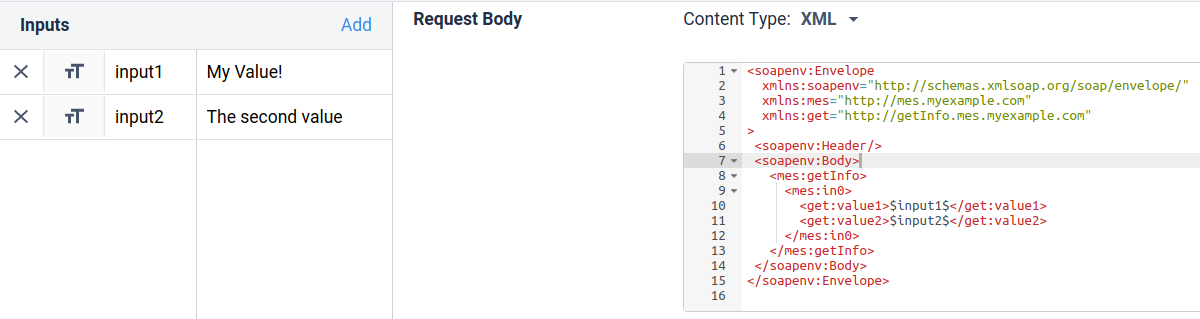
要在请求正文中发送 XML 内容,请使用`$value$`符号表示应插入参数。
例如,在请求正文字段中输入以下内容:
```
xmlns:soapenv="http://schemas.xmlsoap.org/soap/envelope/"
xmlns:mes="http://mes.myexample.com"
xmlns:get="http://getInfo.mes.myexample.com"
>
>
>
>
>
>
>
>
>
> $input1$
>
> $input2$
>
>
>
>
>
>
>
>
> ```
>
>
>
并将`input1`和`input2`的值作为连接器函数的输入,就会发出一个请求,并将`input1`和`input2`的值替换到请求正文中。
这在下面的 Tulip Connector 函数界面中有所显示:
{height="" width=""}
## 在 Tulip 中解析 XML 数据
### 一个简单的 API 示例
让我们从 XML API 的一个简单响应示例开始。
```
xml version="1.0" encoding="UTF-8"?
日常意大利语
Giada De Laurentiis
2005
30.00
哈利-波特
J K. 罗琳
2005
29.99
学习 XML
埃里克-T-雷
2003
39.95
```
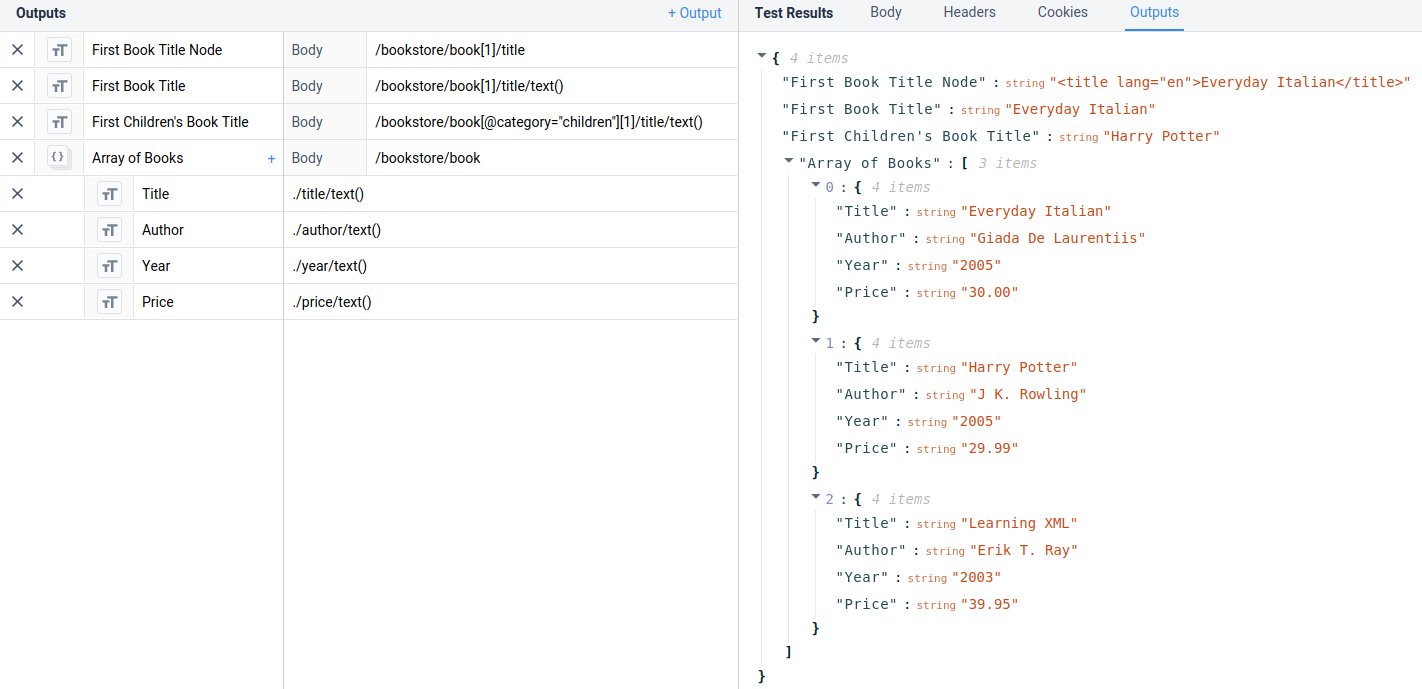
以下示例展示了如何访问 Tulip 中的各种信息。
一个提取器
`/bookstore/book[1]/title`
返回:
`每日意大利语。`
请注意,XML 中的数组是 "1-索引 "的,即第一个元素位于 "1 "的位置,而 {{glossary.JSON}}-query 是 "0-索引 "的。
提取器为
`/bookstore/book[1]/title/text()`
返回:
`日常意大利语`
请注意,`/text()`函数用于提取所选节点中包含的文本值。
的提取器:
`/bookstore/book[@category="children"][1]/title/text()`
会返回
`哈利-波特`
请注意,选择器允许我们在节点的属性中进行搜索。
如下所示,这些示例可直接用于 Tulip:
### SOAP API 示例
现在,让我们用命名空间(SOAP API 的典型特征)来检查一个更复杂的案例。
```
>
>
>
>
>
>
>
>
> 0
>
>
>
>
>
> 信息检索成功
>
>
>
>
>
>
>
> 我的操作
>
> 无
>
> 1234567-890
>
> B
>
>
>
>
>
>
>
> 零件编号
>
> 1234567-890
>
>
>
>
>
> 部件修订
>
> B
>
>
>
>
>
> 零件描述
>
> 我的示例零件
>
>
>
>
>
>
>
> 正常
>
>
>
>
>
>
>
>
>
>
>
>
> ```
>
>
>
此响应使用 XML 命名空间,增加了复杂性。在大多数情况下,使用`//*`和`.//*`操作符进行全局搜索会使提取非常简单。
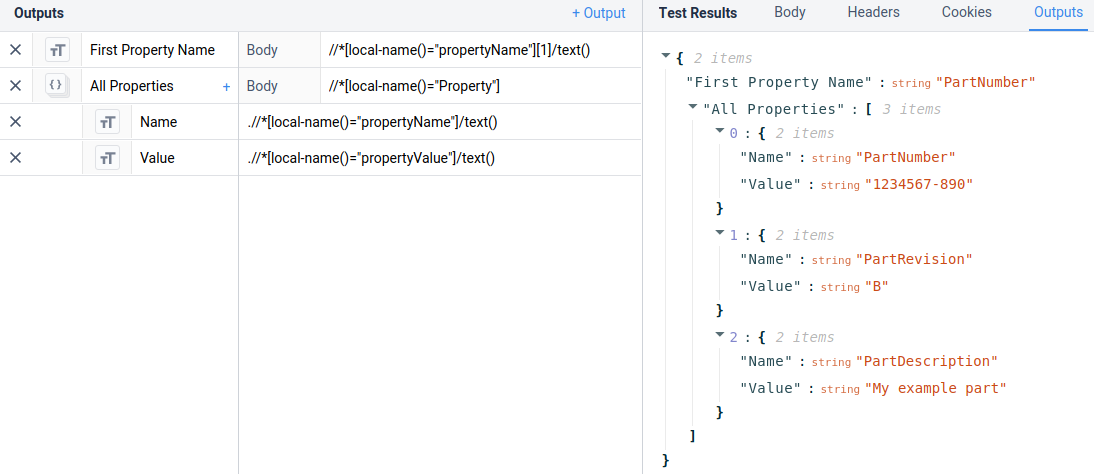
提取器为
`//*[local-name()="propertyName"][1]/text()`
返回:
`零件编号`
请注意,XML 中的数组是 "1-索引 "的,即第一个元素位于 "1 "的位置,而 json-query 是 "0-索引 "的。
提取器为
`//*[本地名称()="属性"]`
返回
` PartNumber 1234567-890 PartRevision B 部件描述 我的示例部件 。`
请注意,命名空间被 "下拉 "到这个结果中。因此,子查询仍将搜索全局名称空间。
要提取对象数组,可使用前面示例中的全局搜索来提取数组,然后使用本地搜索提取器:
`.//*[local-name()="propertyName"]/text()`
形式的对象数组:
`[ { "名称":"部件编号
"值": "1234567-890" }"1234567-890" }, { "Name":"零件修订版"
"值": "B"B"
}, { "名称":"部件描述"
"值":"我的示例零件"
}
]`
这些示例显示在下面的郁金香连接器界面中:
---
找到您想要的了吗?
您还可以前往[community.tulip.co](https://community.tulip.co/?utm_source=intercom&utm_medium=article-link&utm_campaign=all)发布您的问题,或查看其他人是否遇到过类似问题!
```